Identify and Fix a Root Cause using the SRE Agent
This tutorial shows how OpenChoreo's SRE Agent turns an alert into an actionable fix. As part of this tutorial, you will deploy the gcp-microservices-demo sample, scale down a service that the alerting component only reaches through another service, watch an alert fire and then review the AI root cause analysis (RCA) report, which should trace the failure back to its origin and propose a concrete change you can apply from the portal.
Overview
The GCP Microservices demo has several microservices deployed as OpenChoreo components. This tutorial makes a component fail because something it depends on, two hops away, is broken, so the alert fires on the symptom rather than the cause.
- You scale the
paymentcomponent to zero replicas in thedevelopmentenvironment, so its gRPC endpoint stops working. - The
frontendcomponent places orders throughcheckout, which charges the card throughpayment. Orders start failing, the frontend logsfailed to complete the order, and a log-based alert fires onfrontend. - The alert creates an incident with
triggerAiRcaenabled, so the SRE Agent investigates. In a typical run it reads the frontend logs, follows the failing call throughcheckoutintopayment, and inspects payment'sReleaseBinding. - The RCA report should name the zero-replica override on the
payment-developmentReleaseBindingas the root cause. - The report can then propose a concrete change you can apply, such as setting
replicasback to1onpayment-development.
The analysis is generated by an LLM, so the wording of the report and the proposed fix can differ from run to run. The failure here is easy to find, but treat the report as a recommendation to review.
Prerequisites
Before you begin, ensure you have:
- A running OpenChoreo control plane, data plane, and observability plane (with at least the logs module)
- The occ CLI installed and logged in to your OpenChoreo installation
kubectlconfigured to talk to the cluster where OpenChoreo is installed (for the Kubernetes-level steps in this guide)
Step 1: Enable the SRE Agent
The SRE Agent is what produces the RCA report. It needs an LLM API key, a Helm upgrade of the observability plane, and registration with the control plane.
Follow SRE Agent to configure and confirm the pod is running before continuing
If you use OpenAI, we recommend gpt-6-astra. Set rca.llm.modelName=gpt-6-astra when you upgrade the observability plane, or re-run the upgrade with that flag if you have already upgraded. It produced the most consistent reports in testing.
Step 2: Deploy the GCP Microservices Demo
This tutorial is based on the gcp-microservices-demo sample. Deploy it by following the sample's own README, which covers the project, the Redis cache and all ten components. Skip this step if you already deployed it for another tutorial.
All services take 5–10 minutes to become fully operational. Wait until all ten components are Running and the storefront loads before continuing:
kubectl get pods -A -l openchoreo.dev/project=gcp-microservice-demo,openchoreo.dev/environment=development
Step 3: Install the Alert Rule Clustertrait (Optional)
Alert rules are attached to components as instances of the observability-alert-rule clustertrait. OpenChoreo ships it by default, so first check whether it is already in your cluster:
occ clustertrait get observability-alert-rule
If the command returns the clustertrait, skip to the next step. If it reports NotFound, apply it:
kubectl apply -f - <<'EOF'
---
# Trait for Alert Rules
apiVersion: openchoreo.dev/v1alpha1
kind: ClusterTrait
metadata:
  name: observability-alert-rule
spec:
  parameters:
    openAPIV3Schema:
      type: object
      properties:
        description:
          type: string
          description: "A human-readable description of what this alert rule monitors and when it triggers."
        severity:
          type: string
          enum:
            - info
            - warning
            - critical
          default: warning
          description: "The severity level of alerts triggered by this rule. Determines alert priority and notification urgency."
        source:
          type: object
          properties:
            type:
              type: string
              enum:
                - log
                - metric
                - budget
              description: "The data source type for the alert rule."
            query:
              type: string
              default: ""
              description: "The query expression for log-based alerts. Required when source type is 'log'."
            metric:
              type: string
              default: ""
              description: "The predefined metric to monitor for metric-based alerts. Must be one of: cpu_usage, memory_usage. Required when source type is 'metric'."
          required:
            - type
        condition:
          type: object
          properties:
            window:
              type: string
              default: "5m"
              description: "The time window over which data is aggregated before evaluating the alert condition (e.g. 5m, 10m, 30m, 1h)."
            interval:
              type: string
              default: "1m"
              description: "The frequency at which the alert rule is evaluated (e.g. 1m, 5m, 15m, 30m)."
            operator:
              type: string
              enum:
                - gt
                - lt
                - gte
                - lte
                - eq
              default: gt
              description: "The comparison operator used to evaluate the condition against the threshold (gt: greater than, lt: less than, gte: greater than or equal, lte: less than or equal, eq: equal)."
            threshold:
              type: integer
              default: 10
              description: "The numeric threshold value used with the operator to determine when the alert triggers."
      required:
        - description
        - source
        - condition

  environmentConfigs:
    openAPIV3Schema:
      type: object
      properties:
        enabled:
          type: boolean
          default: true
          description: "Controls whether this alert rule is active. When disabled, the rule will not trigger alerts."
        actions:
          type: object
          properties:
            notifications:
              type: object
              properties:
                channels:
                  type: array
                  items:
                    type: string
                  default: []
                  description: "The notification channel identifiers where alerts should be delivered. Configured per environment by platform engineers. If not provided, defaults to the environment's default notification channel."
            incident:
              type: object
              properties:
                enabled:
                  type: boolean
                  default: false
                  description: "Enables incident creation when this alert fires. When enabled, a corresponding incident will be created in the incident management system."
                triggerAiCostAnalysis:
                  type: boolean
                  default: false
                  description: "Enables AI-powered cost analysis when an incident is created for a budget alert. Provides automated cost breakdown and optimization recommendations. Requires incident.enabled to also be true and is only valid for budget source type."
                triggerAiRca:
                  type: boolean
                  default: false
                  description: "Enables AI-powered root cause analysis when an incident is created. When enabled, provides automated reports of root causes for alert conditions. Requires incident.enabled to also be true."

  validations:
    - rule: "${(has(environmentConfigs.actions) && has(environmentConfigs.actions.notifications) && environmentConfigs.actions.notifications.channels.size() > 0) || (has(environment.defaultNotificationChannel) && environment.defaultNotificationChannel != '')}"
      message: "A notification channel is mandatory for alert rules (incident-only rules are not supported). Provide environmentConfigs.actions.notifications.channels or mark an ObservabilityAlertsNotificationChannel of this environment as the default (spec.isEnvDefault: true)."
    - rule: "${!has(environmentConfigs.actions) || !has(environmentConfigs.actions.incident) || environmentConfigs.actions.incident.triggerAiRca == false || environmentConfigs.actions.incident.enabled == true}"
      message: "incident.enabled must be true when triggerAiRca is true. AI-powered root cause analysis requires incident creation to be enabled."
    - rule: "${!has(environmentConfigs.actions) || !has(environmentConfigs.actions.incident) || environmentConfigs.actions.incident.triggerAiCostAnalysis == false || environmentConfigs.actions.incident.enabled == true}"
      message: "incident.enabled must be true when triggerAiCostAnalysis is true. AI-powered cost analysis requires incident creation to be enabled."
    - rule: "${!has(environmentConfigs.actions) || !has(environmentConfigs.actions.incident) || environmentConfigs.actions.incident.triggerAiCostAnalysis == false || parameters.source.type == 'budget'}"
      message: "triggerAiCostAnalysis can only be enabled for budget source type alerts."

  creates:
    - targetPlane: observabilityplane
      includeWhen: ${has(dataplane.observabilityPlaneRef)}
      template:
        apiVersion: openchoreo.dev/v1alpha1
        kind: ObservabilityAlertRule
        metadata:
          name: ${metadata.name}-${trait.instanceName}
          namespace: ${metadata.namespace}
          labels:
            # Required for observability backends. Automatically populated by the controller.
            openchoreo.dev/component-uid: ${metadata.componentUID}
            openchoreo.dev/project-uid: ${metadata.projectUID}
            openchoreo.dev/environment-uid: ${metadata.environmentUID}
        spec:
          name: ${trait.instanceName}
          description: ${parameters.description}
          severity: ${parameters.severity}
          enabled: ${environmentConfigs.enabled}
          source:
            type: ${parameters.source.type}
            query: ${parameters.source.query}
            metric: ${parameters.source.metric}
          condition:
            window: ${parameters.condition.window}
            interval: ${parameters.condition.interval}
            operator: ${parameters.condition.operator}
            threshold: ${parameters.condition.threshold}
          actions:
            notifications:
              channels: >-
                ${(has(environmentConfigs.actions) && has(environmentConfigs.actions.notifications) && environmentConfigs.actions.notifications.channels.size() > 0)
                  ? environmentConfigs.actions.notifications.channels
                  : [environment.defaultNotificationChannel]}
            incident:
              enabled: ${has(environmentConfigs.actions) && has(environmentConfigs.actions.incident) && (environmentConfigs.actions.incident.enabled || environmentConfigs.actions.incident.triggerAiRca || environmentConfigs.actions.incident.triggerAiCostAnalysis)}
              triggerAiCostAnalysis: ${has(environmentConfigs.actions) && has(environmentConfigs.actions.incident) && environmentConfigs.actions.incident.enabled && environmentConfigs.actions.incident.triggerAiCostAnalysis}
              triggerAiRca: ${has(environmentConfigs.actions) && has(environmentConfigs.actions.incident) && environmentConfigs.actions.incident.enabled && environmentConfigs.actions.incident.triggerAiRca}
EOF
Step 4: Configure a Notification Channel
An alert rule must deliver to at least one notification channel, so create one before attaching the rule. For testing, obtain a temporary webhook URL from webhook.site and use it below.
kubectl apply -f - <<'EOF'
apiVersion: openchoreo.dev/v1alpha1
kind: ObservabilityAlertsNotificationChannel
metadata:
  name: webhook-notification-channel-development
  namespace: default
spec:
  environment: development
  type: webhook
  webhookConfig:
    url: https://webhook.site/your-unique-url  # Replace with your webhook URL
    headers:
      Content-Type:
        value: "application/json"
EOF
Skip this step if you have already created a channel for the development environment. If that channel has a different name, use it in place of webhook-notification-channel-development in the channels list in Step 6.
Step 5: Break the Payment Service
Introduce the fault by scaling payment to zero replicas on the development ReleaseBinding:
kubectl patch releasebinding payment-development -n default --type=merge \
  -p '{"spec":{"componentTypeEnvironmentConfigs":{"replicas":0}}}'
Confirm that the payment pod is gone (it can show Terminating for up to 30 seconds first):
kubectl get pods -A -l openchoreo.dev/component=payment,openchoreo.dev/environment=development
No resources found
With no pod behind it, the component's Service has no endpoint, so every call to payment is refused. Only the order flow calls payment, through checkout, so the rest of the storefront keeps working.
Step 6: Attach an Alert Rule with AI RCA Enabled
The alert will be created on the frontend component, because that is where the failure becomes visible to users. When an order fails anywhere downstream, the frontend logs failed to complete the order together with the underlying error.
Attach the alert-rule trait to the frontend component:
- Trigger: more than 5 occurrences of
failed to complete the orderin the frontend logs within 5 minutes - Trait instance name:
frontend-order-failure-log-alert
TRAIT='{
  "name": "observability-alert-rule",
  "kind": "ClusterTrait",
  "instanceName": "frontend-order-failure-log-alert",
  "parameters": {
    "description": "Alert when the frontend fails to complete an order",
    "severity": "critical",
    "source": { "type": "log", "query": "failed to complete the order" },
    "condition": { "window": "5m", "interval": "1m", "operator": "gt", "threshold": 5 }
  }
}'

if [ -z "$(kubectl get component frontend -n default -o jsonpath='{.spec.traits}')" ]; then
  kubectl patch component frontend -n default --type=json \
    -p="[{\"op\": \"add\", \"path\": \"/spec/traits\", \"value\": [${TRAIT}]}]"
else
  kubectl patch component frontend -n default --type=json \
    -p="[{\"op\": \"add\", \"path\": \"/spec/traits/-\", \"value\": ${TRAIT}}]"
fi
If frontend has no traits yet, the command creates the list. Otherwise it appends the new trait, so any trait already on frontend is kept. Kubernetes rejects a second trait with the same instanceName, so see the note below before running it again.
Then enable the rule for the development environment and turn on incident creation and AI RCA through the frontend ReleaseBinding:
kubectl apply -f - <<'EOF'
apiVersion: openchoreo.dev/v1alpha1
kind: ReleaseBinding
metadata:
  name: frontend-development
  namespace: default
spec:
  owner:
    projectName: gcp-microservice-demo
    componentName: frontend
  environment: development
  traitEnvironmentConfigs:
    frontend-order-failure-log-alert:
      enabled: true
      actions:
        notifications:
          channels:
            - "webhook-notification-channel-development"
        incident:
          enabled: true
          triggerAiRca: true
EOF
actions.incident.triggerAiRca: true requires actions.incident.enabled: true. The SRE Agent is invoked when the incident is created, not when the alert fires.
By default, an alert rule fires at most once per hour. To repeat the tutorial within the hour, attach the rule under a new instanceName and use the same name in the ReleaseBinding.
Give the rule about a minute to become active before you continue.
Step 7: Generate Traffic to Trigger the Alert
The alert is log-based, so the frontend has to actually serve requests. In a separate terminal, resolve the frontend route and place orders against it. The loop adds an item to the cart and checks out with the demo's test card:
HOSTNAME=$(kubectl get httproute -A -l openchoreo.dev/component=frontend \
  -o jsonpath='{.items[0].spec.hostnames[0]}')
PATH_PREFIX=$(kubectl get httproute -A -l openchoreo.dev/component=frontend \
  -o jsonpath='{.items[0].spec.rules[0].matches[0].path.value}')

FRONTEND_BASE="http://${HOSTNAME}:19080${PATH_PREFIX%/}"
COOKIES=$(mktemp)
echo "Calling: ${FRONTEND_BASE}"

while true; do
  curl -s -o /dev/null -c "$COOKIES" -b "$COOKIES" -X POST "${FRONTEND_BASE}/cart" \
    -d "product_id=OLJCESPC7Z&quantity=1" || true
  curl -s -o /dev/null -c "$COOKIES" -b "$COOKIES" -X POST "${FRONTEND_BASE}/cart/checkout" \
    -d "email=someone@example.com&street_address=1600+Amphitheatre+Parkway&zip_code=94043&city=Mountain+View&state=CA&country=United+States&credit_card_number=4432801561520454&credit_card_expiration_month=1&credit_card_expiration_year=2039&credit_card_cvv=672" || true
  sleep 0.5
done
Every checkout now returns 500 Internal Server Error, and the frontend logs fill with the error the alert matches. You can confirm this directly:
occ component logs frontend --project gcp-microservice-demo --env development \
  -n default --tail 20 | grep "failed to complete the order"
The log line carries the whole call chain, ending in a refused connection to the payment service:
failed to complete the order: rpc error: code = Internal desc = failed to charge card: could not charge the card: rpc error: code = Unavailable desc = ... connect: connection refused
The frontend-order-failure-log-alert rule typically fires within a minute: a notification goes to your webhook channel and an incident is created. Leave the traffic loop running until you have confirmed the alert.
Step 8: Review the RCA Report
Open the Backstage portal and navigate to the gcp-microservice-demo system (project), then open the RCA Reports tab. A report appears for the incident shortly after it is created. The SRE agent needs a few minutes to work through the report.
In this scenario the agent should trace the failure from the alert on frontend, through checkout, to its origin: the payment component scaled to zero replicas on the payment-development ReleaseBinding. The exact wording varies between runs.
You can also ask follow-up questions about the report from the Portal Assistant, which reads RCA reports through the SRE Agent.
Step 9: Apply the Fix
The report's recommended actions usually include a revised action carrying a concrete change. The portal surfaces it as a Quick Fix alongside the report. Here it should propose setting replicas back to 1 on the payment-development ReleaseBinding:
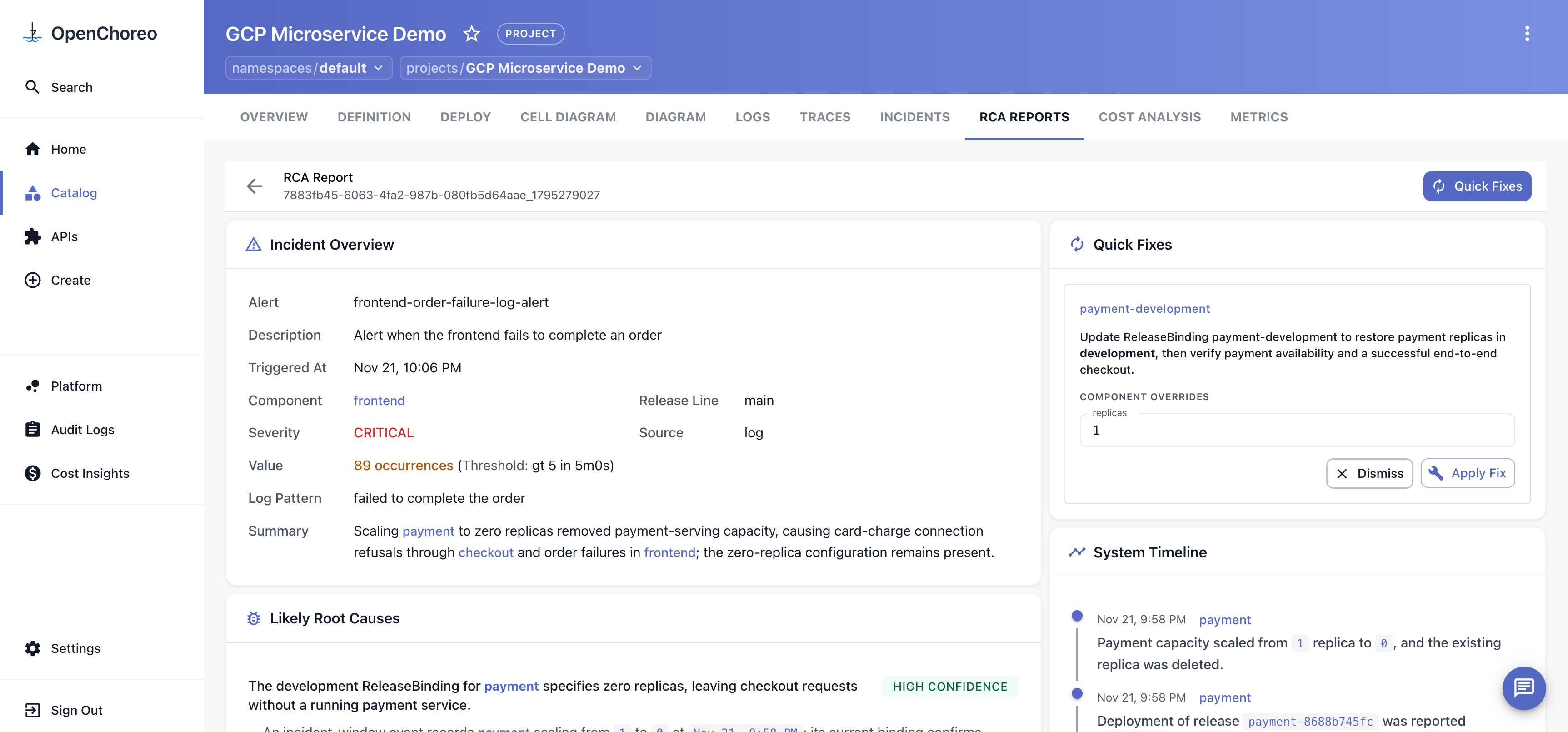
Choose Apply Fix and OpenChoreo patches the binding for you, marking the action as applied.
If the report does not offer a Quick Fix, make the same change yourself:
kubectl patch releasebinding payment-development -n default --type=merge \
  -p '{"spec":{"componentTypeEnvironmentConfigs":{"replicas":1}}}'
Verify that payment recovers:
kubectl get pods -A -l openchoreo.dev/component=payment,openchoreo.dev/environment=development
Once the payment pod is 1/1 Running, orders go through again and the frontend stops logging failed to complete the order. It can take a minute or two after the pod is running before orders succeed again. The alert stops firing on its next evaluation, and you can acknowledge and resolve the incident from the portal.
Stop the traffic loop with Ctrl+C.
Summary
You attached a log-based alert rule with incident creation and AI root cause analysis to the frontend component, then broke a component two hops away by scaling payment to zero.
The alert fired on the symptom, and the SRE Agent should have traced it to the origin: the frontend's failed orders, checkout's refused calls to payment, and finally the zero-replica override on the payment-development ReleaseBinding. You then applied the remediation, from the report or by hand, and confirmed the system recovered.
Next Steps
- Configure and tune the SRE Agent — model selection, report storage, and authentication.
- Set up log-, metric-, and incident-routing for more components in Configure Component Alerts and Manage Incidents.
- Use the FinOps Agent for budget alerts and AI cost analysis.
- Refer to Alerting for how the alerting and RCA architecture fits together.
Cleanup
Delete the sample resources if you no longer need them:
occ project delete gcp-microservice-demo -n default
Delete the notification channel too, but only if you created it in Step 4 for this tutorial. Leave it in place if you reused an existing development channel — other alert rules may still be delivering to it.
occ observabilityalertsnotificationchannel delete webhook-notification-channel-development -n default