Identify and Fix a Root Cause using the SRE Agent
This tutorial shows how OpenChoreo's SRE Agent turns an alert into an actionable fix. As part of this tutorial, you will deploy the gcp-microservices-demo sample, break a shared dependency in it, watch an alert fire and then review the AI root cause analysis (RCA) report that traces the failure back to its origin and proposes a concrete change you can apply from the portal.
Overview
The GCP Microservices demo has several microservices deployed as OpenChoreo components. This tutorial makes a component fail because something it depends on is broken, so the alert fires on the symptom rather than the cause.
- You starve the
cartcomponent of memory, so its container is OOM-killed and crash-loops. This causes the cart gRPC endpoint to stop working. - The
frontendcomponent calls cart on every page load, so it starts logging errors and a log-based alert fires onfrontend. - The alert creates an incident with
triggerAiRcaenabled, so the SRE Agent investigates: it reads the frontend logs, follows the failing gRPC calls into cart, and inspects cart's events, metrics andReleaseBinding. - The resulting RCA report names cart's memory limit as the root cause — and, because cart also depends on a Redis cache, explicitly rules that cache out as the origin.
- The remediation agent turns that into a concrete change you can apply: raise the memory override on the
cart-developmentReleaseBinding.
Prerequisites
Before you begin, ensure you have:
- A running OpenChoreo control plane, data plane, and observability plane (with at least the logs module)
- The occ CLI installed and logged in to your OpenChoreo installation
kubectlconfigured to talk to the cluster where OpenChoreo is installed (for the Kubernetes-level steps in this guide)
Step 1: Enable the SRE Agent
The SRE Agent is what produces the RCA report. It needs an LLM API key, a Helm upgrade of the observability plane, and registration with the control plane.
Follow SRE Agent to configure and confirm the pod is running before continuing
The SRE Agent ships with a remediation agent (rca.remedAgent, enabled by default) that runs after the analysis. It translates the report's generic recommendations into concrete OpenChoreo changes.
Step 2: Deploy the GCP Microservices Demo
This tutorial is based on the gcp-microservices-demo sample. Deploy it by following the sample's own README, which covers the project, the Redis cache and all ten components. Skip this step if you already deployed it for another tutorial.
All services take 5–10 minutes to become fully operational. Wait until all ten components are Running and the storefront loads before continuing:
kubectl get pods -A -l openchoreo.dev/project=gcp-microservice-demo,openchoreo.dev/environment=development
Step 3: Install the Alert Rule Clustertrait (Optional)
Alert rules are attached to components as instances of the observability-alert-rule clustertrait. OpenChoreo ships it by default, so first check whether it is already in your cluster:
occ clustertrait get observability-alert-rule
If the command returns the clustertrait, skip to the next step. If it reports NotFound, apply it:
kubectl apply -f - <<'EOF'
---
# Trait for Alert Rules
apiVersion: openchoreo.dev/v1alpha1
kind: ClusterTrait
metadata:
  name: observability-alert-rule
spec:
  parameters:
    openAPIV3Schema:
      type: object
      properties:
        description:
          type: string
          description: "A human-readable description of what this alert rule monitors and when it triggers."
        severity:
          type: string
          enum:
            - info
            - warning
            - critical
          default: warning
          description: "The severity level of alerts triggered by this rule. Determines alert priority and notification urgency."
        source:
          type: object
          properties:
            type:
              type: string
              enum:
                - log
                - metric
                - budget
              description: "The data source type for the alert rule."
            query:
              type: string
              default: ""
              description: "The query expression for log-based alerts. Required when source type is 'log'."
            metric:
              type: string
              default: ""
              description: "The predefined metric to monitor for metric-based alerts. Must be one of: cpu_usage, memory_usage. Required when source type is 'metric'."
          required:
            - type
        condition:
          type: object
          properties:
            window:
              type: string
              default: "5m"
              description: "The time window over which data is aggregated before evaluating the alert condition (e.g. 5m, 10m, 30m, 1h)."
            interval:
              type: string
              default: "1m"
              description: "The frequency at which the alert rule is evaluated (e.g. 1m, 5m, 15m, 30m)."
            operator:
              type: string
              enum:
                - gt
                - lt
                - gte
                - lte
                - eq
              default: gt
              description: "The comparison operator used to evaluate the condition against the threshold (gt: greater than, lt: less than, gte: greater than or equal, lte: less than or equal, eq: equal)."
            threshold:
              type: integer
              default: 10
              description: "The numeric threshold value used with the operator to determine when the alert triggers."
      required:
        - description
        - source
        - condition

  environmentConfigs:
    openAPIV3Schema:
      type: object
      properties:
        enabled:
          type: boolean
          default: true
          description: "Controls whether this alert rule is active. When disabled, the rule will not trigger alerts."
        actions:
          type: object
          properties:
            notifications:
              type: object
              properties:
                channels:
                  type: array
                  items:
                    type: string
                  default: []
                  description: "The notification channel identifiers where alerts should be delivered. Configured per environment by platform engineers. If not provided, defaults to the environment's default notification channel."
            incident:
              type: object
              properties:
                enabled:
                  type: boolean
                  default: false
                  description: "Enables incident creation when this alert fires. When enabled, a corresponding incident will be created in the incident management system."
                triggerAiCostAnalysis:
                  type: boolean
                  default: false
                  description: "Enables AI-powered cost analysis when an incident is created for a budget alert. Provides automated cost breakdown and optimization recommendations. Requires incident.enabled to also be true and is only valid for budget source type."
                triggerAiRca:
                  type: boolean
                  default: false
                  description: "Enables AI-powered root cause analysis when an incident is created. When enabled, provides automated reports of root causes for alert conditions. Requires incident.enabled to also be true."

  validations:
    - rule: "${(has(environmentConfigs.actions) && has(environmentConfigs.actions.notifications) && environmentConfigs.actions.notifications.channels.size() > 0) || (has(environment.defaultNotificationChannel) && environment.defaultNotificationChannel != '')}"
      message: "A notification channel is mandatory for alert rules (incident-only rules are not supported). Provide environmentConfigs.actions.notifications.channels or set environment.defaultNotificationChannel."
    - rule: "${!has(environmentConfigs.actions) || !has(environmentConfigs.actions.incident) || environmentConfigs.actions.incident.triggerAiRca == false || environmentConfigs.actions.incident.enabled == true}"
      message: "incident.enabled must be true when triggerAiRca is true. AI-powered root cause analysis requires incident creation to be enabled."
    - rule: "${!has(environmentConfigs.actions) || !has(environmentConfigs.actions.incident) || environmentConfigs.actions.incident.triggerAiCostAnalysis == false || environmentConfigs.actions.incident.enabled == true}"
      message: "incident.enabled must be true when triggerAiCostAnalysis is true. AI-powered cost analysis requires incident creation to be enabled."
    - rule: "${!has(environmentConfigs.actions) || !has(environmentConfigs.actions.incident) || environmentConfigs.actions.incident.triggerAiCostAnalysis == false || parameters.source.type == 'budget'}"
      message: "triggerAiCostAnalysis can only be enabled for budget source type alerts."

  creates:
    - targetPlane: observabilityplane
      includeWhen: ${has(dataplane.observabilityPlaneRef)}
      template:
        apiVersion: openchoreo.dev/v1alpha1
        kind: ObservabilityAlertRule
        metadata:
          name: ${metadata.name}-${trait.instanceName}
          namespace: ${metadata.namespace}
          labels:
            # Required for observability backends. Automatically populated by the controller.
            openchoreo.dev/component-uid: ${metadata.componentUID}
            openchoreo.dev/project-uid: ${metadata.projectUID}
            openchoreo.dev/environment-uid: ${metadata.environmentUID}
        spec:
          name: ${trait.instanceName}
          description: ${parameters.description}
          severity: ${parameters.severity}
          enabled: ${environmentConfigs.enabled}
          source:
            type: ${parameters.source.type}
            query: ${parameters.source.query}
            metric: ${parameters.source.metric}
          condition:
            window: ${parameters.condition.window}
            interval: ${parameters.condition.interval}
            operator: ${parameters.condition.operator}
            threshold: ${parameters.condition.threshold}
          actions:
            notifications:
              channels: >-
                ${(has(environmentConfigs.actions) && has(environmentConfigs.actions.notifications) && environmentConfigs.actions.notifications.channels.size() > 0)
                  ? environmentConfigs.actions.notifications.channels
                  : [environment.defaultNotificationChannel]}
            incident:
              enabled: ${has(environmentConfigs.actions) && has(environmentConfigs.actions.incident) && (environmentConfigs.actions.incident.enabled || environmentConfigs.actions.incident.triggerAiRca || environmentConfigs.actions.incident.triggerAiCostAnalysis)}
              triggerAiCostAnalysis: ${has(environmentConfigs.actions) && has(environmentConfigs.actions.incident) && environmentConfigs.actions.incident.enabled && environmentConfigs.actions.incident.triggerAiCostAnalysis}
              triggerAiRca: ${has(environmentConfigs.actions) && has(environmentConfigs.actions.incident) && environmentConfigs.actions.incident.enabled && environmentConfigs.actions.incident.triggerAiRca}
EOF
Step 4: Configure a Notification Channel
An alert rule must deliver to at least one notification channel, so create one before attaching the rule. For testing, obtain a temporary webhook URL from webhook.site and use it below.
kubectl apply -f - <<'EOF'
apiVersion: openchoreo.dev/v1alpha1
kind: ObservabilityAlertsNotificationChannel
metadata:
  name: webhook-notification-channel-development
  namespace: default
spec:
  environment: development
  type: webhook
  webhookConfig:
    url: https://webhook.site/your-unique-url  # Replace with your webhook URL
    headers:
      Content-Type:
        value: "application/json"
EOF
Skip this step if you have already created a channel for the development environment. If that channel has a different name, use it in place of webhook-notification-channel-development in the channels list in Step 5.
Step 5: Attach an Alert Rule with AI RCA Enabled
The alert will be created on the frontend component, because that is where the failure becomes visible to users. The frontend calls the cart service on both the home page and the /cart page, and logs could not retrieve cart whenever that call fails.
Attach the alert-rule trait to the frontend component:
- Trigger: more than 5 occurrences of
could not retrieve cartin the frontend logs within 5 minutes - Trait instance name:
frontend-cart-failure-log-alert
if occ component get frontend -n default 2>/dev/null \
     | grep -q "instanceName: frontend-cart-failure-log-alert"; then
  echo "Trait 'frontend-cart-failure-log-alert' already exists on component 'frontend', skipping."
else
  kubectl patch component frontend -n default --type=json -p='[
    {
      "op": "add",
      "path": "/spec/traits/-",
      "value": {
        "name": "observability-alert-rule",
        "kind": "ClusterTrait",
        "instanceName": "frontend-cart-failure-log-alert",
        "parameters": {
          "description": "Alert when the frontend cannot retrieve the shopping cart",
          "severity": "critical",
          "source": { "type": "log", "query": "could not retrieve cart" },
          "condition": { "window": "5m", "interval": "1m", "operator": "gt", "threshold": 5 }
        }
      }
    }
  ]' 2>/dev/null || kubectl patch component frontend -n default --type=json -p='[
    {
      "op": "add",
      "path": "/spec/traits",
      "value": [{
        "name": "observability-alert-rule",
        "kind": "ClusterTrait",
        "instanceName": "frontend-cart-failure-log-alert",
        "parameters": {
          "description": "Alert when the frontend cannot retrieve the shopping cart",
          "severity": "critical",
          "source": { "type": "log", "query": "could not retrieve cart" },
          "condition": { "window": "5m", "interval": "1m", "operator": "gt", "threshold": 5 }
        }
      }]
    }
  ]'
fi
Then enable the rule for the development environment and turn on incident creation and AI RCA through the frontend ReleaseBinding:
kubectl apply -f - <<'EOF'
apiVersion: openchoreo.dev/v1alpha1
kind: ReleaseBinding
metadata:
  name: frontend-development
  namespace: default
spec:
  owner:
    projectName: gcp-microservice-demo
    componentName: frontend
  environment: development
  traitEnvironmentConfigs:
    frontend-cart-failure-log-alert:
      enabled: true
      actions:
        notifications:
          channels:
            - "webhook-notification-channel-development"
        incident:
          enabled: true
          triggerAiRca: true
EOF
actions.incident.triggerAiRca: true requires actions.incident.enabled: true. The SRE Agent is invoked when the incident is created, not when the alert fires.
Step 6: Break the Cart Service
Now introduce the fault. The cart service normally uses around 170Mi; cap it well below that on the development ReleaseBinding:
kubectl patch releasebinding cart-development -n default --type=merge \
  -p '{"spec":{"componentTypeEnvironmentConfigs":{"resources":{"requests":{"memory":"64Mi"},"limits":{"memory":"64Mi"}}}}}'
Within seconds the cart pod is recreated, exceeds the limit during startup, and is killed:
kubectl get pods -A -l openchoreo.dev/component=cart,openchoreo.dev/environment=development
NAMESPACE                                      NAME                                         READY   STATUS      RESTARTS     AGE
dp-default-gcp-microserv-development-4b8b4fdc  cart-development-c71e0317-57d96b8897-5jnq9   0/1     OOMKilled   1 (7s ago)   16s
The restart count climbs and the pod settles into CrashLoopBackOff. Confirm the kill reason:
kubectl get pods -A -l openchoreo.dev/component=cart,openchoreo.dev/environment=development \
  -o jsonpath='{.items[0].status.containerStatuses[0].lastState.terminated.reason}'
OOMKilled
With no healthy cart pod the component's Service loses its endpoint, so every call from frontend is refused.
Step 7: Generate Traffic to Trigger the Alert
The alert is log-based, so the frontend has to actually serve requests. In a separate terminal, resolve the frontend route and drive traffic at it:
HOSTNAME=$(kubectl get httproute -A -l openchoreo.dev/component=frontend \
  -o jsonpath='{.items[0].spec.hostnames[0]}')
PATH_PREFIX=$(kubectl get httproute -A -l openchoreo.dev/component=frontend \
  -o jsonpath='{.items[0].spec.rules[0].matches[0].path.value}')

FRONTEND_BASE="http://${HOSTNAME}:19080${PATH_PREFIX%/}"
echo "Calling: ${FRONTEND_BASE} and ${FRONTEND_BASE}/cart"

while true; do
  curl -s -o /dev/null "${FRONTEND_BASE}/" || true
  curl -s -o /dev/null "${FRONTEND_BASE}/cart" || true
  sleep 0.5
done
Both pages now return 500 Internal Server Error, and the frontend logs fill with the error the alert matches. You can confirm this directly:
occ component logs frontend --project gcp-microservice-demo --env development \
  -n default --tail 20 | grep "could not retrieve cart"
Within the 5-minute evaluation window the frontend-cart-failure-log-alert rule fires, a notification goes to your webhook channel, and an incident is created. Leave the traffic loop running until you have confirmed the alert.
Step 8: Review the RCA Report
Open the Backstage portal and navigate to the gcp-microservice-demo system (project), then open the RCA Reports tab. A report appears for the incident shortly after it is created. The SRE agent needs a minute or two to work through the report.
For this scenario the agent traces the failure from the alert back to its origin - the cart service not having enough memory.
You can also ask follow-up questions about the report from the Portal Assistant, which reads RCA reports through the SRE Agent.
Step 9: Apply the Fix
With the remediation agent enabled, the report's recommended actions include a revised action carrying a concrete change. The portal surfaces it as a Quick Fix alongside the report — here it proposes raising the cart-development memory overrides to 256Mi:
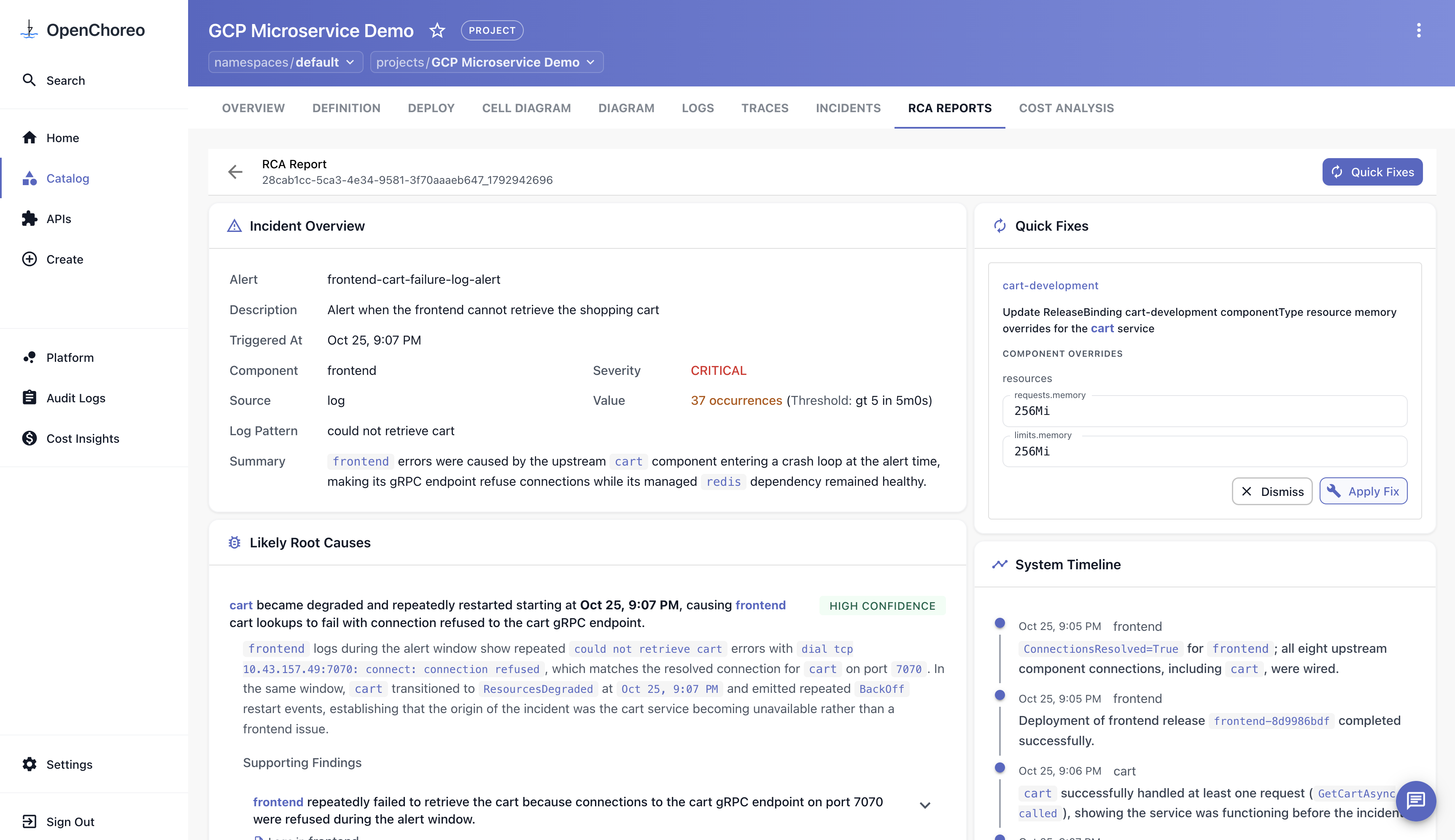
Choose Apply Fix and OpenChoreo patches the binding for you, marking the action as applied.
Verify that cart recovers:
kubectl get pods -A -l openchoreo.dev/component=cart,openchoreo.dev/environment=development
Once the cart pod is 1/1 Running with a stable restart count, the frontend stops logging could not retrieve cart and both pages return 200 again. Give the pod a moment to finish starting before testing. The alert stops firing on its next evaluation, and you can acknowledge and resolve the incident from the portal.
Stop the traffic loop with Ctrl+C.
Summary
You attached a log-based alert rule with incident creation and AI root cause analysis to the frontend component, then broke a different component by starving cart of memory until it was OOM-killed.
The alert fired on the symptom, and the SRE Agent traced it to the origin: the frontend's refused gRPC calls, cart's OOM-kill and restart events, and finally the memory override on the cart-development ReleaseBinding — ruling out cart's Redis dependency along the way. You then applied the remediation it recommended and confirmed the system recovered.
Next Steps
- Configure and tune the SRE Agent — model selection, report storage, and authentication.
- Set up log-, metric-, and incident-routing for more components in Configure Component Alerts and Manage Incidents.
- Use the FinOps Agent for budget alerts and AI cost analysis.
- Refer to Observability Alerting for how the alerting and RCA architecture fits together.
Cleanup
Delete the sample resources if you no longer need them:
occ project delete gcp-microservice-demo -n default
Delete the notification channel too, but only if you created it in Step 4 for this tutorial. Leave it in place if you reused an existing development channel — other alert rules may still be delivering to it.
occ observabilityalertsnotificationchannel delete webhook-notification-channel-development -n default