CI Workflows
CI workflows are Workflows that integrate with OpenChoreo's components. They use the same Workflow and WorkflowRun resources, with governance via ComponentTypes.
What Makes a CI Workflow Different
A Workflow is used for CI when:
- It carries
openchoreo.dev/workflow-type: "component"label — Required for UI to categorize the workflows - A Component references it via
Component.spec.workflow.name - It is listed in
ComponentType.spec.allowedWorkflows— This is how platform engineers control which workflows are available for components of a given type
There is no separate CRD: CI workflows are just Workflows that are allowed by a ComponentType and referenced by Components.
CI Workflow Lifecycle
1. Platform Engineer creates Workflow/ClusterWorkflow CR
   └── Defines parameter schema with repository fields

2. Platform Engineer adds Workflow to ComponentType.spec.allowedWorkflows
   └── Only workflows in this list can be used by Components

3. Developer creates Component
   └── References the Workflow by name in spec.workflow
   └── Component controller validates the workflow against allowedWorkflows

4. WorkflowRun created
   └── Labels added: openchoreo.dev/component, openchoreo.dev/project
   └── Controller renders and executes the Argo Workflow

5. (Optional) Workload generated from build output
   └── Controller reads generate-workload-cr step output
   └── Creates Workload CR in the control plane
Labels and Schema Extensions
openchoreo.dev/workflow-type label
Required for workflows intended to be used by Components. The UI and CLI use this label to identify and categorize a workflow as a CI workflow.
metadata:
  labels:
    openchoreo.dev/workflow-type: "component"
Vendor extension fields for Auto-Build and UI
CI workflows must annotate specific openAPIV3Schema fields with x-openchoreo-component-parameter-repository-* vendor extensions. These extensions tell OpenChoreo which parameter fields correspond to repository settings, enabling the auto-build feature (triggered by Git webhooks) and UI integration.
| Extension | Purpose | Required |
|---|---|---|
x-openchoreo-component-parameter-repository-url | Identifies the Git repository URL field | No |
x-openchoreo-component-parameter-repository-branch | Identifies the Git branch field | No |
x-openchoreo-component-parameter-repository-commit | Identifies the Git commit SHA field | No |
x-openchoreo-component-parameter-repository-app-path | Identifies the application path field | No |
x-openchoreo-component-parameter-repository-secret-ref | Identifies the secret reference field | No |
Add true to each extension on the corresponding schema field:
parameters:
  openAPIV3Schema:
    type: object
    required:
      - repository
    properties:
      repository:
        type: object
        description: "Git repository configuration"
        required:
          - url
        properties:
          url:
            type: string
            description: "Git repository URL"
            x-openchoreo-component-parameter-repository-url: true
          secretRef:
            type: string
            default: ""
            description: "Secret reference name for Git credentials"
            x-openchoreo-component-parameter-repository-secret-ref: true
          revision:
            type: object
            default: {}
            properties:
              branch:
                type: string
                default: main
                description: "Git branch to checkout"
                x-openchoreo-component-parameter-repository-branch: true
              commit:
                type: string
                default: ""
                description: "Git commit SHA or reference (optional, defaults to latest)"
                x-openchoreo-component-parameter-repository-commit: true
          appPath:
            type: string
            default: "."
            description: "Path to the application directory within the repository"
            x-openchoreo-component-parameter-repository-app-path: true
The field structure (nesting, names) is flexible — OpenChoreo discovers the fields by walking the schema tree for these extensions, regardless of where they are placed. These extensions are required if you use auto-build (Git webhook-triggered builds), and optional otherwise to enable richer UI behavior.
WorkflowRun Labels
When a WorkflowRun is created for a component, it carries labels that link it to the component:
metadata:
  labels:
    openchoreo.dev/component: greeter-service
    openchoreo.dev/project: default
These labels are accessible in the Workflow CR's CEL expressions:
${metadata.labels['openchoreo.dev/component']}— Component name${metadata.labels['openchoreo.dev/project']}— Project name
Architecture
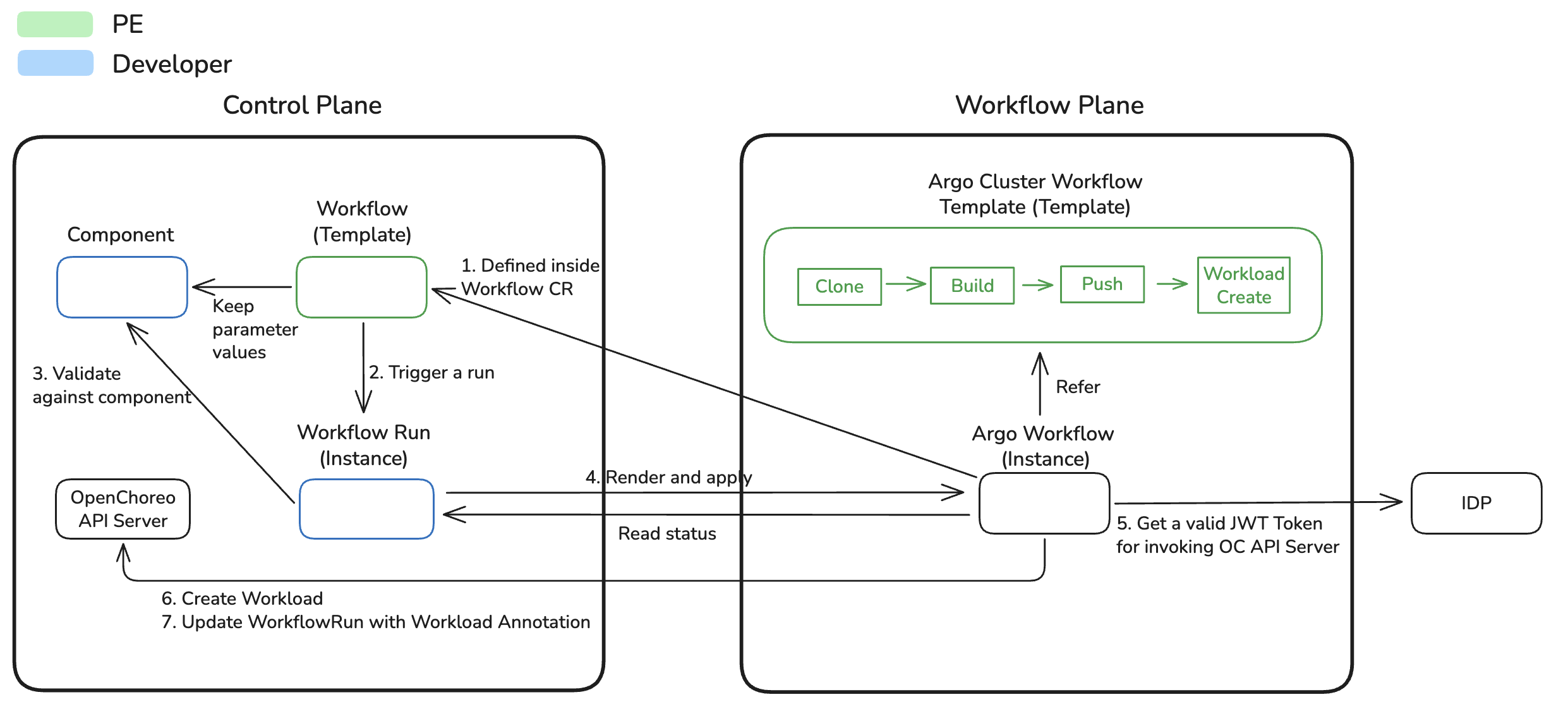
Governance via ComponentTypes
Platform engineers control which CI workflows are available for components using ComponentType's allowedWorkflows field. This is the primary governance mechanism for CI workflows.
How It Works
- Platform Engineer defines
allowedWorkflowsin a ComponentType - When a developer creates a Component, they must reference a workflow in
spec.workflow.name - The Component controller validates that the referenced workflow is in the ComponentType's
allowedWorkflowslist - If validation fails, the Component enters a Failed state with a condition explaining the error
allowedWorkflows Field
apiVersion: openchoreo.dev/v1alpha1
kind: ClusterComponentType
metadata:
  name: backend
spec:
  # Restrict components to using only these ClusterWorkflows
  allowedWorkflows:
    - kind: ClusterWorkflow
      name: dockerfile-builder
    - kind: ClusterWorkflow
      name: gcp-buildpacks-builder
Each entry has two fields:
kind—ClusterWorkflow(cluster-scoped) orWorkflow(namespace-scoped). Defaults toClusterWorkflow.name— Name of the workflow resource.
Only Workflows listed in allowedWorkflows can be referenced by Components of this type.
Governance Patterns
Pattern 1: Single Workflow (Strict)
spec:
  allowedWorkflows:
    - kind: ClusterWorkflow
      name: dockerfile-builder
Pattern 2: Multiple Workflows (Developer Choice)
spec:
  allowedWorkflows:
    - kind: ClusterWorkflow
      name: dockerfile-builder
    - kind: ClusterWorkflow
      name: gcp-buildpacks-builder
    - kind: Workflow
      name: custom-react-builder
Pattern 3: Language-Specific Workflows
spec:
  allowedWorkflows:
    - kind: ClusterWorkflow
      name: dockerfile-builder            # For compiled languages
    - kind: ClusterWorkflow
      name: gcp-buildpacks-builder        # For interpreted languages
Validation and Error Handling
Component-level validation
When a Component references a workflow that's not in allowedWorkflows, the Component controller rejects it:
conditions:
  - type: Ready
    status: False
    reason: WorkflowNotAllowed
    message: "Workflow 'custom-workflow' is not in ComponentType 'backend' allowedWorkflows"
The Component will not proceed to creating WorkflowRuns until the workflow is either added to allowedWorkflows or changed to one that is allowed.
WorkflowRun-level validation
When a WorkflowRun is created with component labels (openchoreo.dev/component and openchoreo.dev/project), the WorkflowRun controller performs additional validations before execution:
| Validation | Condition Reason | Description |
|---|---|---|
| Both labels required | ComponentValidationFailed | If one of openchoreo.dev/project or openchoreo.dev/component is set, both must be present |
| Component exists | ComponentValidationFailed | The referenced Component must exist in the same namespace |
| Project label matches | ComponentValidationFailed | The openchoreo.dev/project label must match the Component's owner project |
| ComponentType exists | ComponentValidationFailed | The Component's ComponentType (or ClusterComponentType) must exist |
| Workflow allowed | ComponentValidationFailed | The workflow referenced by the WorkflowRun must be in the ComponentType's allowedWorkflows |
| Workflow matches component | ComponentValidationFailed | If the Component has spec.workflow configured, the WorkflowRun must reference the same workflow |
| Workflow exists | WorkflowNotFound | The referenced Workflow or ClusterWorkflow must exist in the cluster |
| WorkflowPlane available | WorkflowPlaneNotFound | A WorkflowPlane must be available for the workflow |
All ComponentValidationFailed conditions are permanent failures. WorkflowPlaneNotFound is transient and retried automatically.
Benefits of This Governance Model
- Security — Platform engineers ensure only approved build processes are used
- Consistency — All components of a type follow the same build patterns
- Compliance — Easy to enforce organizational policies (e.g., "all builds must scan for vulnerabilities")
- Flexibility — Different component types can have different allowed workflows
- Developer Experience — Clear error messages when trying to use disallowed workflows
Default CI Workflows
OpenChoreo ships with four default ClusterWorkflow CRs and their supporting ClusterWorkflowTemplates:
| ClusterWorkflow | Build CWT | Description |
|---|---|---|
dockerfile-builder | containerfile-build | Build with a provided Dockerfile/Containerfile/Podmanfile |
gcp-buildpacks-builder | gcp-buildpacks-build | Supports Go, Java, Node.js, Python, and .NET applications |
paketo-buildpacks-builder | paketo-buildpacks-build | Supports Java, Node.js, Python, Go, .NET, Ruby, PHP, and more |
ballerina-buildpack-builder | ballerina-buildpack-build | Builds applications written in Ballerina |
What's Next
- Workload Generation — How build outputs become Workload CRs