Workflows in OpenChoreo
OpenChoreo provides a unified Workflow design for running automation tasks. Whether you need component CI builds, infrastructure provisioning, data pipelines, or any other automation, it all uses the same Workflow and WorkflowRun resources.
OpenChoreo currently supports only Argo Workflows as the underlying engine for executing workflows. It can be extended to support more Kubernetes-native engines.
Multi-Plane Architecture
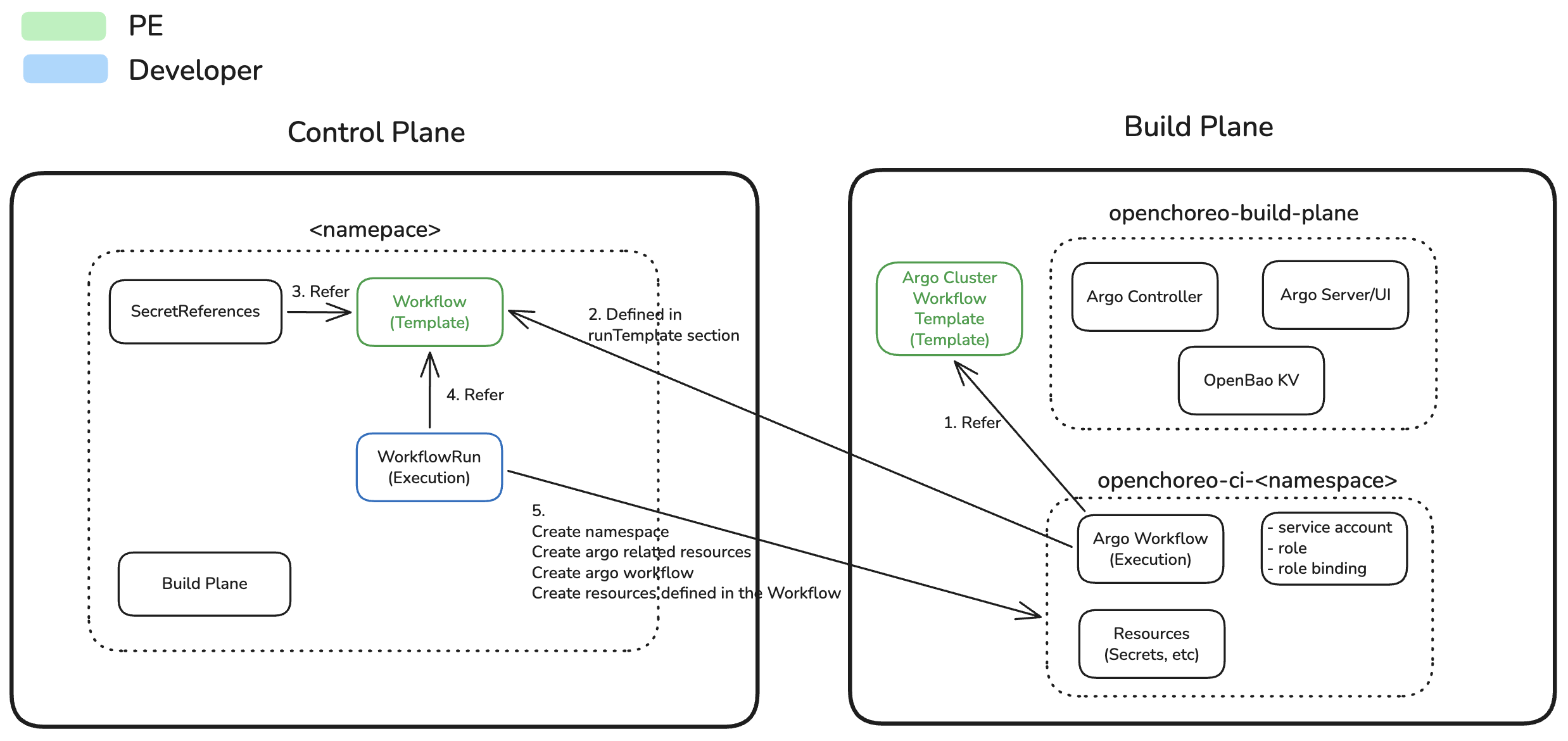
- Control Plane: Hosts Workflow and WorkflowRun CRs, orchestrates execution
- Build Plane: Executes Argo Workflows using ClusterWorkflowTemplates, performs compute-intensive operations
- Communication: Control plane controller connects to build plane via a websocket connection
In Single Cluster Setup, both planes run in the same cluster.
Core Resources
Workflow
A Workflow is a platform engineer-defined template that specifies what to execute. It consists of:
- Schema: Defines developer-facing parameters that can be configured when triggering an execution
- RunTemplate: An inline Argo Workflow manifest with CEL expressions (
${metadata.*},${parameters.*},${externalRefs['<id>'].spec.*}) that composes one or more ClusterWorkflowTemplates into a pipeline - Resources: Additional Kubernetes resources needed for the workflow (e.g., ExternalSecrets for credentials)
- ExternalRefs: References to external CRs (e.g.,
SecretReference) resolved at runtime and injected into the CEL context - TTLAfterCompletion: Optional duration after which completed runs are automatically deleted
Workflows live in the control plane and bridge it to the build plane where actual execution happens.
WorkflowRun
A WorkflowRun represents a single execution instance. When created, it:
- References the Workflow to use
- Provides actual values for the schema parameters
- Triggers the controller to render and execute the Argo Workflow in the build plane
- Tracks execution state through conditions and task status
WorkflowRun is an imperative resource, it triggers an action rather than declaring a desired state. Do not include WorkflowRuns in GitOps repositories. Instead, create them through Git webhooks, the UI, or direct kubectl apply commands.
Argo ClusterWorkflowTemplate
An Argo ClusterWorkflowTemplate (CWT) is an Argo Workflows resource that defines a single reusable step at cluster scope in the build plane. Each CWT encapsulates one discrete operation - cloning a repo, building an image, pushing to a registry, etc.
CWTs are not full pipelines. Instead, the Workflow CR's runTemplate contains an inline Argo Workflow that composes multiple CWTs into a pipeline using per-step templateRef references:
apiVersion: openchoreo.dev/v1alpha1
kind: Workflow
spec:
  runTemplate:
    apiVersion: argoproj.io/v1alpha1
    kind: Workflow
    metadata:
      name: ${metadata.workflowRunName}
      namespace: openchoreo-ci-${metadata.namespaceName}
    spec:
      serviceAccountName: workflow-sa
      entrypoint: pipeline
      templates:
        - name: pipeline
          steps:
            - - name: checkout-source
                templateRef:
                  name: checkout-source
                  template: checkout
                  clusterScope: true
            - - name: build-image
                templateRef:
                  name: docker
                  template: build-image
                  clusterScope: true
At runtime, OpenChoreo renders runTemplate and creates an Argo Workflow instance in the build plane.
As a Platform Engineer, you only author the inline template inside the Workflow CR's runTemplate.
We are recommending to use Argo ClusterWorkflowTemplates for all steps to maximize reuse and maintainability. This way, you can update the logic of a step (e.g., how to build a Docker image) in one place and have it automatically applied to all Workflows that reference it.
Workflow Scope
Generic Workflows
Generic workflows execute standalone automation tasks not tied to any component. Use them for:
- Infrastructure Provisioning — Terraform, Pulumi, or cloud resource automation
- Data Processing (ETL) — Extract, transform, and load pipelines
- End-to-End Testing — Integration and acceptance test suites
- Package Publishing — Publishing libraries to npm, PyPI, Maven, etc.
- Custom Docker Builds — Container image builds not tied to a component
Component Workflows (CI)
Component workflows are regular Workflow CRs used within Components. They enable:
- Auto-builds triggered by Git webhooks
- UI integration for component scope workflow management
- ComponentType governance via
allowedWorkflows - Workload generation from build outputs
In OpenChoreo, a Workflow is "component-capable" when:
- It carries
openchoreo.dev/workflow-scope: "component"(required for workflows intended to be used by Components) - It is referenced by a Component via
Component.spec.workflow.name - It is explicitly allowed by the ComponentType via
ComponentType.spec.allowedWorkflows
openchoreo.dev/workflow-scope: "component" is required for workflows intended to be used by Components.
openchoreo.dev/component-workflow-parameters is only required if you use auto-build feature or you want to have UI enrichments.
See CI Workflows for the full guide.
Resource Cleanup
WorkflowRuns can be cleaned up in two ways:
Manual Deletion: When deleted via kubectl delete, the controller removes all resources created in the build plane.
Automatic TTL-based Cleanup: Platform engineers configure ttlAfterCompletion in the Workflow template:
apiVersion: openchoreo.dev/v1alpha1
kind: Workflow
metadata:
  name: docker
spec:
  ttlAfterCompletion: "7d"  # Retain for 7 days after completion
  # ...
TTL format: Duration string without spaces — days (d), hours (h), minutes (m), seconds (s). Examples: "90d", "1h30m", "1d12h30m15s".
What's Next
- Creating Workflows — Step-by-step guide for defining custom Workflows
- Running Workflows — How to trigger and monitor WorkflowRuns
- CI Workflows — Component-specific workflows with governance and auto-build