CI Workflows
CI workflows are Workflows that integrate with OpenChoreo's components. They use the same Workflow and WorkflowRun resources, with governance via ComponentTypes.
What Makes a CI Workflow Different
A Workflow is used for CI when:
- It carries
openchoreo.dev/workflow-scope: "component"— Required for workflows intended to be used by Components - A Component references it via
Component.spec.workflow.name - It is listed in
ComponentType.spec.allowedWorkflows— This is how platform engineers control which workflows are available for components of a given type
There is no separate CRD: CI workflows are just Workflows that are allowed by a ComponentType and referenced by Components.
CI Workflow Lifecycle
1. Platform Engineer creates Workflow CR
   └── Defines parameter schema with repository fields

2. Platform Engineer adds Workflow to ComponentType.spec.allowedWorkflows
   └── Only workflows in this list can be used by Components

3. Developer creates Component
   └── References the Workflow by name in spec.workflow
   └── Component controller validates the workflow against allowedWorkflows

4. WorkflowRun created
   └── Labels added: openchoreo.dev/component, openchoreo.dev/project
   └── Controller renders and executes the Argo Workflow

5. (Optional) Workload generated from build output
   └── Controller reads generate-workload-cr step output
   └── Creates Workload CR in the control plane
Annotations
openchoreo.dev/workflow-scope (Required)
Required for workflows intended to be used by Components, and used by developer tooling (for example occ) to categorize a workflow as CI.
metadata:
  annotations:
    openchoreo.dev/workflow-scope: "component"
openchoreo.dev/component-workflow-parameters (Required for Auto-Build feature and UI enrichments)
metadata:
  annotations:
    openchoreo.dev/component-workflow-parameters: |
      repoUrl: parameters.repository.url
      branch: parameters.repository.revision.branch
      appPath: parameters.repository.appPath
      commit: parameters.repository.revision.commit
      secretRef: parameters.repository.secretRef
WorkflowRun Labels
When a WorkflowRun is created for a component, it carries labels that link it to the component:
metadata:
  labels:
    openchoreo.dev/component: greeter-service
    openchoreo.dev/project: default
These labels are accessible in the Workflow CR's CEL expressions:
${metadata.labels['openchoreo.dev/component']}— Component name${metadata.labels['openchoreo.dev/project']}— Project name
Architecture
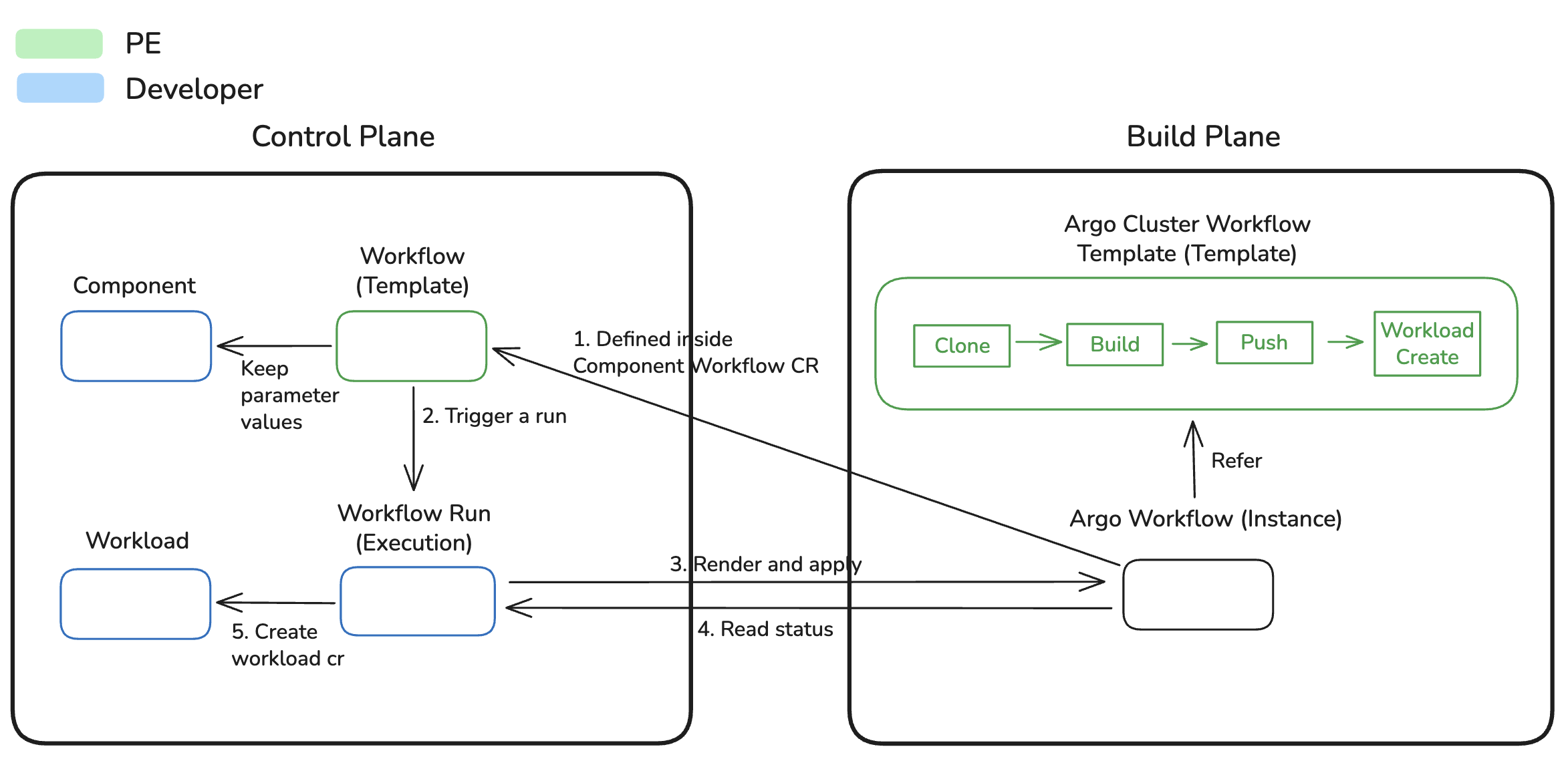
Governance via ComponentTypes
Platform engineers control which CI workflows are available for components using ComponentType's allowedWorkflows field. This is the primary governance mechanism for CI workflows.
How It Works
- Platform Engineer defines
allowedWorkflowsin a ComponentType - When a developer creates a Component, they must reference a workflow in
spec.workflow.name - The Component controller validates that the referenced workflow is in the ComponentType's
allowedWorkflowslist - If validation fails, the Component enters a Failed state with a condition explaining the error
allowedWorkflows Field
apiVersion: openchoreo.dev/v1alpha1
kind: ComponentType
metadata:
  name: backend
spec:
  # Restrict components to using only docker and google-cloud-buildpacks workflows
  allowedWorkflows:
    - docker
    - google-cloud-buildpacks
Only Workflows listed in allowedWorkflows can be referenced by Components of this type.
Governance Patterns
Pattern 1: Single Workflow (Strict)
spec:
  allowedWorkflows:
    - docker  # All components must use this workflow
Pattern 2: Multiple Workflows (Developer Choice)
spec:
  allowedWorkflows:
    - docker
    - google-cloud-buildpacks
    - react
Pattern 3: Language-Specific Workflows
spec:
  allowedWorkflows:
    - docker                      # For compiled languages
    - google-cloud-buildpacks     # For interpreted languages
    - ballerina-buildpack         # For Ballerina services
Validation and Error Handling
When a Component references a workflow that's not in allowedWorkflows:
ComponentStatus:
conditions:
  - type: Ready
    status: False
    reason: WorkflowNotAllowed
    message: "Workflow 'custom-workflow' is not in ComponentType 'backend' allowedWorkflows"
The Component will not proceed to creating WorkflowRuns until the workflow is either:
- Added to the ComponentType's
allowedWorkflows - Changed to a workflow that is allowed
Benefits of This Governance Model
- Security — Platform engineers ensure only approved build processes are used
- Consistency — All components of a type follow the same build patterns
- Compliance — Easy to enforce organizational policies (e.g., "all builds must scan for vulnerabilities")
- Flexibility — Different component types can have different allowed workflows
- Developer Experience — Clear error messages when trying to use disallowed workflows
Default CI Workflows
OpenChoreo ships with four default Workflow CRs and their supporting ClusterWorkflowTemplates:
| Workflow CR | Build CWT | Description |
|---|---|---|
docker | docker | Builds container images using a user-provided Dockerfile |
google-cloud-buildpacks | google-cloud-buildpacks | Auto-detects language and builds without a Dockerfile |
ballerina-buildpack | ballerina-buildpack | Ballerina-specific buildpack builds |
react | react | Optimized React/SPA frontend builds with nginx serving |
What's Next
- Workload Generation — How build outputs become Workload CRs