CI with OpenChoreo
OpenChoreo's CI capabilities enable platform engineers to define, manage, and execute build and automation workflows. By leveraging Kubernetes-native technologies like Argo Workflows, OpenChoreo provides a scalable and flexible CI solution that integrates seamlessly with existing DevOps toolchains.
OpenChoreo currently supports only Argo Workflows as the underlying engine for executing CI workflows. It can be extended to support more Kubernetes-native engines.
High-Level Architecture
The following diagram illustrates the high-level architecture and key resources involved in OpenChoreo's CI system:
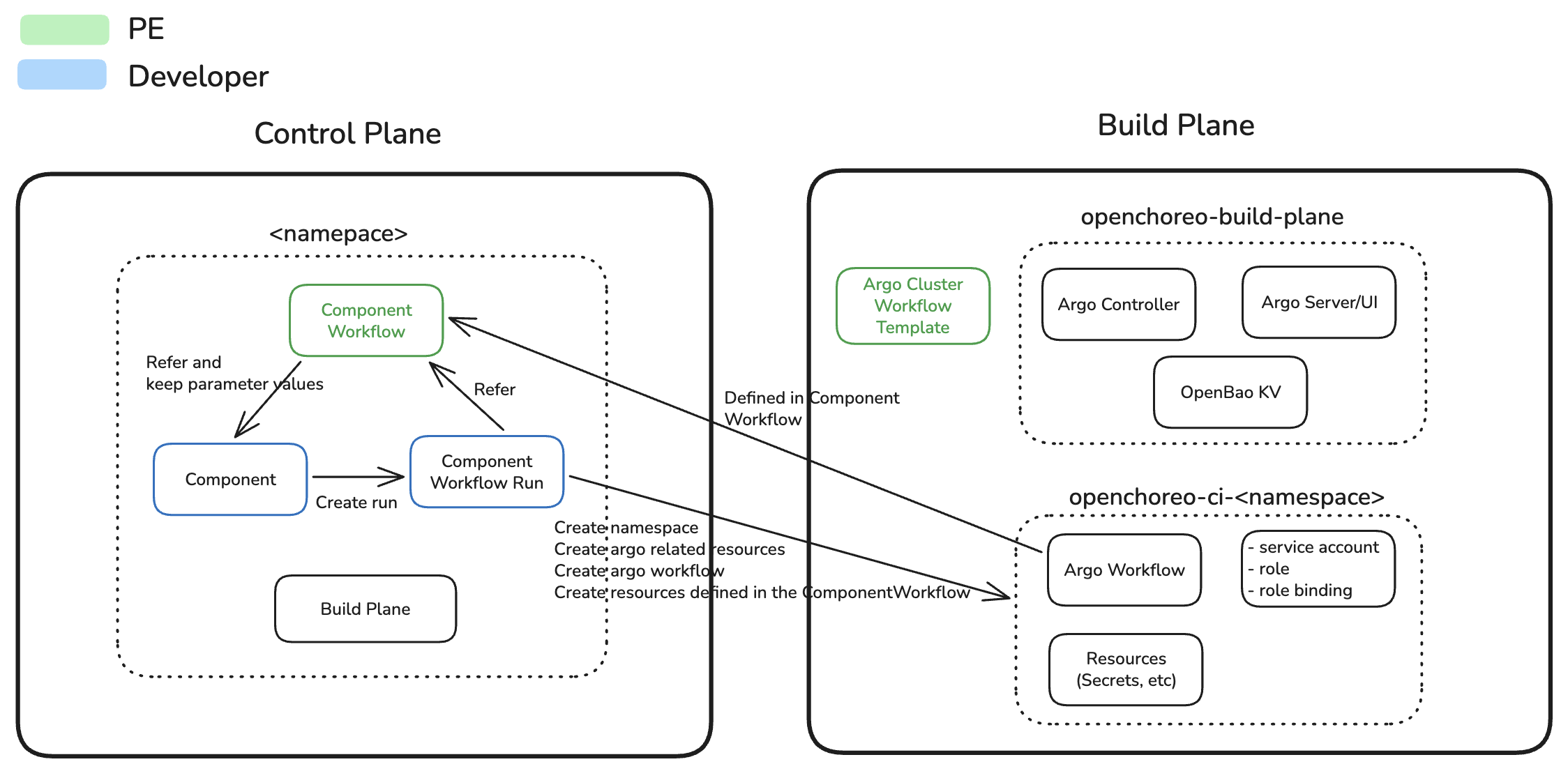
Multi-Plane Separation
- Control Plane: Hosts ComponentWorkflow and ComponentWorkflowRun CRs, orchestrates workflow execution
- Build Plane: Executes Argo Workflows using ClusterWorkflowTemplates, performs compute-intensive build operations
- Communication: Control plane controller connects to build plane via a websocket connection
In Single Cluster Setup, both planes run in the same cluster.
Core Concepts
ComponentWorkflow
A ComponentWorkflow is a platform engineer-defined template that specifies how to build applications. It consists of:
- Schema: Defines system parameters (fixed structure for repository, branch, commit) and developer parameters (flexible, PE-defined fields like version, build options, resources)
- RunTemplate: An Argo Workflow template with template variables (
${metadata.*},${systemParameters.*},${parameters.*}) - Resources: Additional Kubernetes resources needed for the workflow (e.g., ExternalSecrets for Git credentials)
- TTLAfterCompletion (optional): Defines how long completed workflow runs should be retained before automatic deletion
ComponentWorkflows live in the control plane and are referenced by Components. Platform engineers control which workflows are available and what parameters developers can configure.
ComponentWorkflowRun
A ComponentWorkflowRun represents a single execution instance of a ComponentWorkflow. When created, it:
- References the Component being built (projectName, componentName)
- References the ComponentWorkflow to use
- Provides actual values for system and developer parameters
- Tracks execution state through conditions (WorkflowPending, WorkflowRunning, WorkflowSucceeded, WorkflowFailed, WorkloadUpdated)
- Stores outputs (image reference, resource references, workflow run reference)
- Inherits the TTL (time-to-live) setting from the ComponentWorkflow template
ComponentWorkflowRuns are created either manually or automatically (e.g., via Git webhooks).
The TTL value is copied from the referenced ComponentWorkflow when the ComponentWorkflowRun is created. Once the workflow completes (either successfully or with failure), the completedAt timestamp is set, and the controller will automatically delete the ComponentWorkflowRun after the specified TTL duration expires.
ComponentWorkflowRun is an imperative resource, it triggers an action (a build) rather than declaring a desired state. Each time a ComponentWorkflowRun is applied, it initiates a new build execution. For this reason, do not include ComponentWorkflowRuns in GitOps repositories. Instead, create them through Git webhooks, the UI, or direct kubectl apply commands.
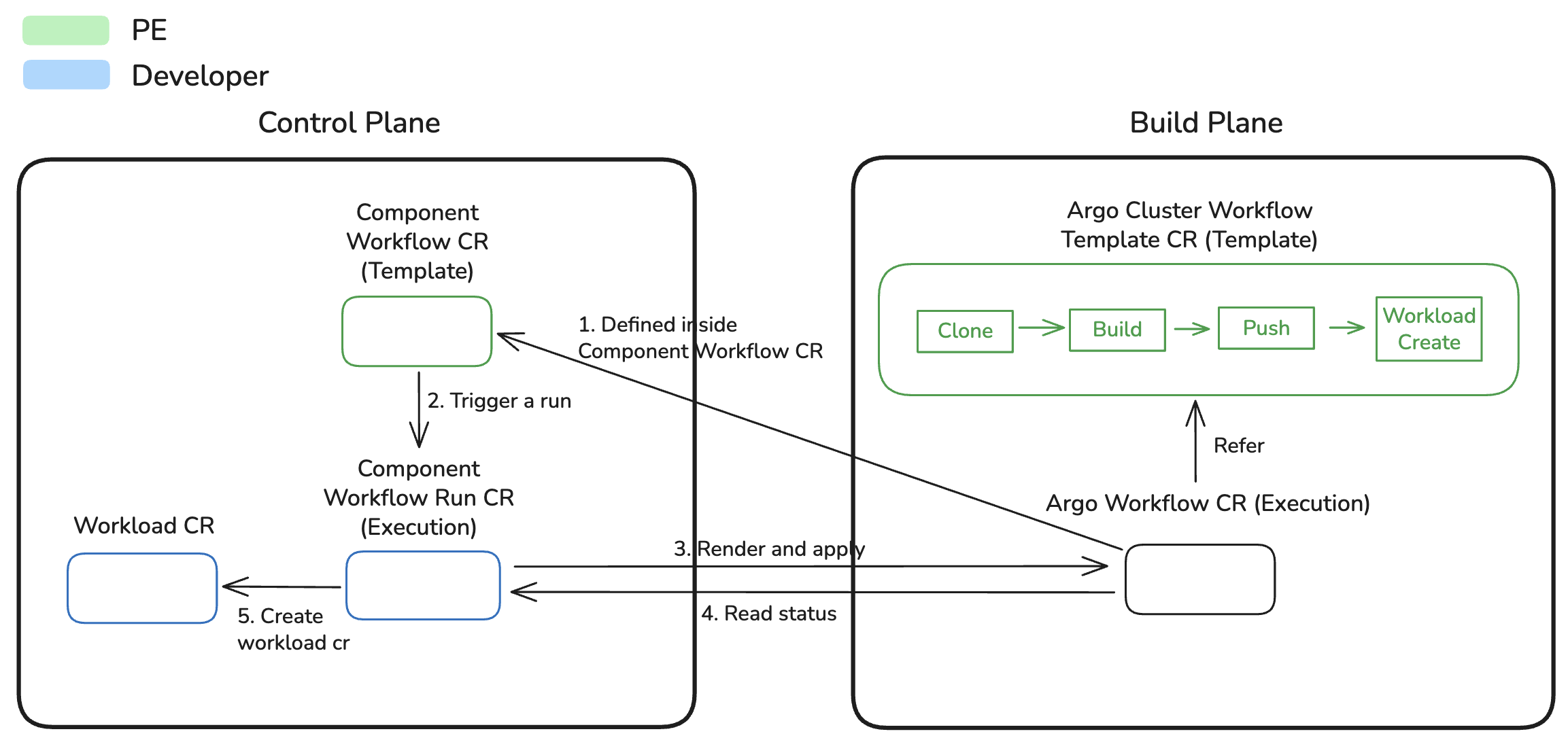
The diagram below illustrates the relationship between key CI resources and their interaction with the control plane and build plane:
Execution Lifecycle
When a ComponentWorkflowRun is created, the following lifecycle occurs:
- Initialization: ComponentWorkflowRun CR created (manually or via webhook)
- Template Rendering: Controller fetches ComponentWorkflow and renders the runTemplate by substituting all template variables with values from ComponentWorkflowRun
- Build Plane Setup: Controller creates namespace (
openchoreo-ci-{namespaceName}), ServiceAccount, Role, and RoleBinding in build plane - Resource Application: Additional resources (ExternalSecrets, ConfigMaps, etc.) applied to build plane
- Workflow Execution: Rendered Argo Workflow applied to build plane, execution begins
- Status Polling: Controller polls workflow status and updates ComponentWorkflowRun conditions:
WorkflowCompleted: Workflow completed either successfully or with failureWorkflowRunning: Argo Workflow executingWorkflowSucceeded: Workflow completed successfullyWorkflowFailed: Workflow failed or errored
- Workload Creation: On success, controller extracts image reference from publish-image output and creates/updates Workload CR
- Completion:
WorkloadUpdatedcondition set to true, reconciliation complete
Resource Cleanup
ComponentWorkflowRuns can be cleaned up in two ways:
Manual Deletion
When a ComponentWorkflowRun is manually deleted (e.g., via kubectl delete):
- Controller removes all resources created in build plane (ExternalSecrets, ConfigMaps, Workflow, etc.)
Automatic TTL-based Cleanup
Platform engineers can configure automatic cleanup using the ttlAfterCompletion field in ComponentWorkflow templates:
apiVersion: openchoreo.dev/v1alpha1
kind: ComponentWorkflow
metadata:
  name: docker
  namespace: default
spec:
  ttlAfterCompletion: "7d"  # Retain for 7 days after completion
  # ... other ComponentWorkflow spec fields
TTL format: Duration string without spaces supporting days (d), hours (h), minutes (m), and seconds (s)
- Examples:
"90d","10d","1h30m","30m","1d12h30m15s" - If empty or not specified, workflow runs are retained indefinitely
Benefits:
- Automatic housekeeping: No manual intervention needed to clean up old workflow runs
- Cost savings: Reduces storage overhead from accumulating workflow run history
- Compliance: Meets data retention policies by automatically removing old build artifacts
- Customizable retention: Different workflows can have different retention periods based on importance
Default ComponentWorkflows
OpenChoreo ships with four default ComponentWorkflows installed in the control plane:
- docker: Builds container images using Docker/Podman with a Dockerfile
- google-cloud-buildpacks: Builds container images using Google Cloud Buildpacks (auto-detects language)
- ballerina-buildpack: Builds Ballerina applications using Ballerina-specific buildpacks
- react: Builds React applications with optimized frontend build process
These workflows reference corresponding ClusterWorkflowTemplates in the build plane.
ClusterWorkflowTemplate
ClusterWorkflowTemplates are an Argo Workflows concept used to define reusable workflow templates at cluster scope in the build plane. For more details, refer to the Argo Workflows documentation.
OpenChoreo ships composable ClusterWorkflowTemplates that are installed via kubectl apply (not through the Helm chart):
kubectl apply -f https://raw.githubusercontent.com/openchoreo/openchoreo/main/samples/getting-started/workflow-templates.yaml
Coordinator CWTs (one per build type):
- docker: Docker-based builds using Dockerfile
- google-cloud-buildpacks: Google Cloud Buildpacks with automatic language detection
- ballerina-buildpack: Ballerina-specific buildpack builds
- react: React application builds
Shared CWTs (referenced by all coordinators via templateRef):
- checkout-source: Clones the source repository
- publish-image: Pushes the built image to a registry
- generate-workload-cr: Creates a Workload CR from the built image
Each coordinator uses templateRef to call the shared CWTs. To customize a step (for example, changing the registry), replace just that shared CWT:
kubectl apply -f your-custom-publish-image.yaml
Each coordinator template defines a standard four-step build workflow:
Build Workflow Steps
1. Checkout Source
Clones the source repository (private or public) and supports both branch and specific commit checkout.
Key features:
- Automatic Git provider detection (GitHub, GitLab, Bitbucket, AWS CodeCommit)
- Private repository authentication
- Specific commit checkout or latest commit on branch
2. Build Image
The build image step executes the actual container image build process. The specific commands vary based on the selected build strategy.
3. Publish Image Step
Pushes the built container image to the container registry. OpenChoreo includes a default registry for development, but external registries can be configured.
Process:
- Loads the tarred image from the build image step
- Pushes to registry (with optional TLS verification)
- Outputs full image reference for subsequent steps
Image naming convention:
This naming convention ensures each image is uniquely identifiable and traceable back to its source code and build context.
{registry-endpoint}/{namespace-name}-{project-name}-{component-name}:{version}-{git-revision}
The publish-image step outputs a parameter named image containing the full image reference (registry endpoint, name, and tag). This output is consumed by the generate-workload-cr step to create the Workload CR with the correct container image. The ComponentWorkflowRun controller also stores this image reference in the workflow run status for tracking and debugging.
4. Workload CR Creation
The Generate Workload CR step generates a Workload CR (Custom Resource) that defines the runtime specification for the Component. A Workload includes container configurations, network endpoints, and connections to other services.
This is an optional step. For alternative approaches to creating a Workload CR, see Custom Workflows.
Process:
- Checks for
workload.yamldescriptor in the repository at the specifiedappPath - Uses
openchoreo-clito create Workload CR - Outputs the Workload CR YAML
Behavior:
- With workload.yaml: Full workload specification with endpoints, connections, and configurations
- Without workload.yaml: Basic workload with just the container image (additional configurations can be added at deployment time)
The ComponentWorkflowRun controller retrieves this Workload CR from the workflow output and creates/updates the Workload resource in the control plane.
The workload CR is an output of the generate-workload-cr with the parameter name workload-cr. This name must remain consistent even when creating custom ClusterWorkflowTemplates, as the ComponentWorkflowRun controller expects this specific output parameter to retrieve the generated Workload CR.
name: generate-workload-cr
outputs:
  parameters:
    - name: workload-cr
      valueFrom:
        path: /mnt/vol/workload-cr.yaml
Workflow Governance
Allowing ComponentWorkflows for Components
Platform engineers control which ComponentWorkflows are available to developers by configuring the allowedWorkflows field in ComponentType CRs.
Example configuration:
apiVersion: openchoreo.dev/v1alpha1
kind: ComponentType
metadata:
  name: service
  namespace: default
spec:
  workloadType: deployment
  allowedWorkflows:
    - google-cloud-buildpacks
    - ballerina-buildpack
    - docker
  # ... other ComponentType spec fields
Benefits:
- Governance: Only approved build strategies can be used
- Consistency: Enforces organizational build standards
- Compliance: Ensures security scanning and build policies are applied
- Flexibility: Different component types can have different allowed workflows
Components can only reference workflows from their component type's allowed list. This prevents developers from using unapproved or potentially insecure build processes.