Securing APIs with OAuth2 Security
OpenChoreo provides comprehensive API Management capabilities through its WSO2 API Platform module, including OAuth2 security, AI gateway features with guardrails and MCP authentication, and request transformations. This guide walks you through enabling API Management and securing your APIs with OAuth2 authentication for your components.
Prerequisites
Before you begin, ensure you have:
- OpenChoreo installed in your Kubernetes cluster
- kubectl configured to access your cluster
- Helm 3.12+ installed
- curl or similar tool for testing API endpoints
Installation
The API Platform module is disabled by default. You need to explicitly enable it during OpenChoreo installation or upgrade.
Enable During Initial Installation
When installing OpenChoreo Dataplane, enable the API Platform module using the --set flag:
helm upgrade --install openchoreo-data-plane oci://ghcr.io/openchoreo/helm-charts/openchoreo-data-plane \
  --version 0.0.0-latest-dev \
  --namespace openchoreo-data-plane \
  --create-namespace \
  --set gateway.httpPort=19080 \
  --set gateway.httpsPort=19443 \
  --set gateway.envoy.mountTmpVolume=true \
  --set api-platform.enabled=true
Enable in Existing Installation
If OpenChoreo Dataplane is already installed, first install the API Platform CRDs:
kubectl apply --server-side \
    -f https://raw.githubusercontent.com/wso2/api-platform/gateway-v0.3.0/kubernetes/helm/operator-helm-chart/crds/gateway.api-platform.wso2.com_restapis.yaml \
    -f https://raw.githubusercontent.com/wso2/api-platform/gateway-v0.3.0/kubernetes/helm/operator-helm-chart/crds/gateway.api-platform.wso2.com_gateways.yaml
Then upgrade the OpenChoreo Data plane to enable API Management:
helm upgrade --install openchoreo-data-plane oci://ghcr.io/openchoreo/helm-charts/openchoreo-data-plane \
  --version 0.0.0-latest-dev \
  --namespace openchoreo-data-plane \
  --reuse-values \
  --set api-platform.enabled=true
Verify Installation
After enabling the API Platform, verify that all components are running:
# Check API Platform pods
kubectl get pods -n openchoreo-data-plane --selector="app.kubernetes.io/instance=api-platform-default-gateway"
You should see pods similar to:
NAME                                                          READY   STATUS    RESTARTS   AGE
api-platform-default-gateway-controller-6d574f8478-skd8n      1/1     Running   0          17m
api-platform-default-gateway-policy-engine-6ccc5f76b4-m87f7   1/1     Running   0          17m
api-platform-default-gateway-router-55cd96cfc9-njf56          1/1     Running   0          17m
Deploy a Sample Service
Let's deploy the Go Greeter Service to demonstrate API Management capabilities. If you've already deployed this service from the Deploy Your First Component guide, you can skip this step.
kubectl apply -f https://raw.githubusercontent.com/openchoreo/openchoreo/main/samples/from-image/go-greeter-service/greeter-service.yaml
Wait for the deployment to complete:
kubectl get releasebinding greeter-service-development
Test that the service is accessible:
curl http://development-default.openchoreoapis.localhost:19080/greeter-service/greeter/greet\?name\=OpenChoreo
You should receive:
Hello, OpenChoreo!
Enable API Management for Your Component
To secure your component with API Management, you need to add an API Management trait. This can be done in two ways:
Option 1: Update Component Custom Resource
Add the API Management trait configuration to your Component resource by applying it directly:
kubectl apply -f - <<EOF
apiVersion: openchoreo.dev/v1alpha1
kind: Component
metadata:
  name: greeter-service
  namespace: default
spec:
  autoDeploy: true
  componentType: deployment/service
  owner:
    projectName: default
  parameters:
    exposed: true
    port: 9090
    replicas: 1
    resources:
      limits:
        cpu: 500m
        memory: 512Mi
      requests:
        cpu: 100m
        memory: 256Mi
  traits:
    - instanceName: greeter-api
      name: api-configuration
      parameters:
        apiName: greeter-api
        apiVersion: v1.0
        context: /greeter-api/v1.0
        policies:
          - name: jwt-auth
            version: v0.1.0
        upstreamPort: 9090
EOF
Option 2: Using the OpenChoreo UI (Backstage)
If you have the Backstage UI installed:
- Navigate to your component in the Backstage UI
- Go to the Traits tab in the top menu
- Click Add Trait
- Select api-configuration from the available traits
- Configure the trait parameters:
| Parameter | Value |
|---|---|
| Instance Name | greeter-api |
| API Name | greeter-api |
| API Version | v1.0 |
| Context | /greeter-api/v1.0 |
| Policy Name | jwt-auth |
| Policy Version | v0.1.0 |
| Upstream Port | 9090 |
To enforce policies, add them to the Policies section in the Trait configurations using key-value pairs. For this sample, use the following key-value pairs to specify the JWTAuthentication policy:
- name:
jwt-auth - version:
v0.1.0
Learn more about policies in the WSO2 API Platform.
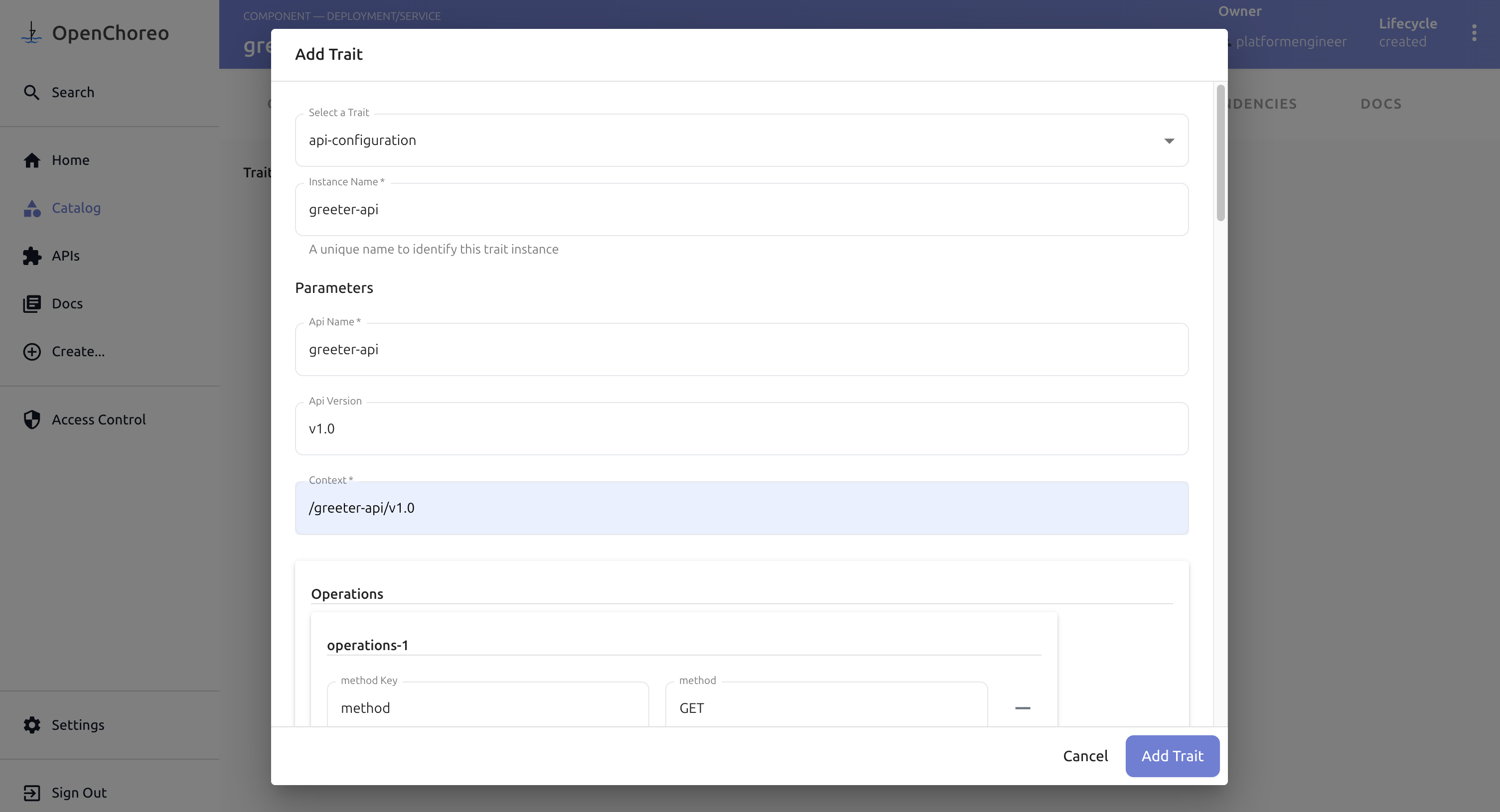
- Click Add Trait and Save Changes to apply changes to your component.
Before saving changes, verify the Trait is properly configured with following details.
Parameters:
apiName: greeter-api
apiVersion: v1.0
context: /greeter-api/v1.0
operations: [ { "method": "GET", "path": "/*" }, { "method": "POST", "path": "/*" }, { "method": "PUT", "path": "/*" }, { "method": "DELETE", "path": "/*" }, { "method": "PATCH", "path": "/*" }, { "method": "OPTIONS", "path": "/*" } ]
policies: [ { "name": "jwt-auth", "version": "v0.1.0" } ]
upstreamPort: 9090
Wait for Configuration to Apply
Monitor the component to ensure the API Management trait is applied:
kubectl get component/greeter-service -o yaml
Wait for the release to be updated:
kubectl get releasebinding greeter-service-development -o yaml
Obtain an Access Token
OpenChoreo Control Plane uses WSO2 Thunder IDP for System Authentication. For testing purposes, OpenChoreo automatically creates an OAuth Application. Let's obtain an access token using the test OAuth Application.
Please use the following test credentials to get a token:
- Client ID:
customer-portal-client - Client Secret:
supersecret
Request an Access Token
Use the OAuth2 client credentials flow to obtain a token:
curl -k -X POST https://thunder.openchoreo.localhost:8443/oauth2/token \
  -d 'grant_type=client_credentials' \
  -d 'client_id=customer-portal-client' \
  -d 'client_secret=supersecret'
You should receive a response similar to:
{
  "access_token": "eyJhbGciOiJSUzI1NiIsImtpZCI6Ik11WGVKS...",
  "token_type": "Bearer",
  "expires_in": 3600
}
Save the access token for testing:
export ACCESS_TOKEN="eyJhbGciOiJSUzI1NiIsImtpZCI6Ik11WGVKS..."
Test API Authentication
Now let's verify that API Management is working correctly.
Test Without Token (Should Fail)
Try accessing the API without authentication:
curl -i http://development-default.openchoreoapis.localhost:19080/greeter-service/greeter/greet
You should receive a 401 Unauthorized response:
HTTP/1.1 401 Unauthorized
content-type: application/json
content-length: 59
date: Mon, 22 Dec 2025 16:28:58 GMT
server: envoy
x-envoy-upstream-service-time: 20

{"error":"Unauthorized","message":"Authentication failed."}
This confirms that API Management is protecting your endpoint.
Test With Token (Should Succeed)
Now test with the access token:
curl http://development-default.openchoreoapis.localhost:19080/greeter-service/greeter/greet\?name\=OpenChoreo \
  -H "Authorization: Bearer $ACCESS_TOKEN"
You should receive a 200 OK response:
HTTP/1.1 200 OK
date: Mon, 22 Dec 2025 16:32:11 GMT
content-length: 19
content-type: text/plain; charset=utf-8
x-envoy-upstream-service-time: 18
server: envoy

Hello, OpenChoreo!
Troubleshooting
API Platform Pods Not Running
Check pod status and logs:
kubectl get pods -n openchoreo-data-plane -l app.kubernetes.io/instance=api-platform-default-gateway
kubectl logs -n openchoreo-data-plane -l app.kubernetes.io/instance=api-platform-default-gateway
Token Validation Failures
Verify Thunder IDP is accessible:
kubectl get svc -n openchoreo-control-plane thunder-service
kubectl logs -n openchoreo-control-plane -l app.kubernetes.io/name=thunder
API Still Accessible Without Token
Check that the component has the API Management trait applied:
kubectl get component greeter-service -o jsonpath='{.spec.traits}'
Verify the release has been updated:
kubectl describe releasebinding greeter-service-development
Summary
You've successfully:
- Enabled the API Platform module in OpenChoreo
- Deployed a sample service and secured it with OAuth2 authentication
- Obtained and validated access tokens using client credentials flow
- Tested OAuth2 token-based access control
- Verified that your API endpoints are protected from unauthorized access
Your components are now protected with OAuth2 security—all managed declaratively through OpenChoreo!
Next Steps
- Learn more about WSO2 API Platform policies
- Set up Observability and Alerting
- Configure Identity Provider Configuration
Clean Up
To disable API Management for a component, remove the trait:
kubectl patch component greeter-service --type=json \
  -p='[{"op": "remove", "path": "/spec/traits"}]'
To uninstall the API Platform module:
helm upgrade openchoreo-data-plane oci://ghcr.io/openchoreo/helm-charts/openchoreo-data-plane \
--version 0.0.0-latest-dev \
--namespace openchoreo-data-plane \
--reuse-values \
--set api-platform.enabled=false