API Gateway Topology
OpenChoreo has a well-architected API Gateway topology designed to cater to a wide range of API Gateway use cases. The topology is built on top of three main principles:
- Traffic Direction — Whether traffic flows into the cluster (Ingress) or out of it (Egress)
- Networking Configuration — Whether the gateway is exposed externally to the internet or internally within the cluster network / VPC
- Granularity — Whether the gateway is shared at the DataPlane level or dedicated to a specific Environment
These three dimensions can be combined to describe any gateway in an OpenChoreo deployment.
Default Gateway
By default, OpenChoreo installs one gateway at the DataPlane level:
| Gateway | Traffic Direction | Networking | Granularity |
|---|---|---|---|
| Ingress External Gateway | Ingress | External | DataPlane |
With this default configuration, APIs and routes deployed across all environments are hosted as unique virtual hosts on the shared DataPlane level gateway. This keeps infrastructure costs low and is well suited for basic use cases where environments do not have strict isolation requirements.
Internal Gateway
By default, the DataPlane gateway is internet-facing (external). For traffic that should not be exposed to the public internet — such as service-to-service communication or traffic restricted to a private VPC subnet — you can add an internal gateway.
An internal gateway can be configured in two ways depending on your environment:
ClusterIP— accessible only within the cluster, suitable for pure in-cluster service-to-service trafficLoadBalancer— accessible within the VPC/private network but not the public internet, suitable when services span multiple nodes or clusters within a private network (using cloud provider annotations such asservice.beta.kubernetes.io/aws-load-balancer-internal: "true")
External Gateway (LoadBalancer)     Internal Gateway (ClusterIP or internal LB)
───────────────────────────────     ──────────────────────────────────────────
  Accessible from the internet        Not accessible from the public internet
  ├── dev virtual host                ├── dev virtual host
  ├── staging virtual host            ├── staging virtual host
  └── production virtual host         └── production virtual host
The configuration steps below are based on the default kgateway API gateway module. If you are using a different API gateway module, refer to that module's documentation instead. Available gateway modules are listed in the modules page.
Configuring an Internal Gateway
Step 1: Create GatewayParameters
Create a GatewayParameters resource to configure the underlying service type. The example below uses ClusterIP for in-cluster-only access:
apiVersion: gateway.kgateway.dev/v1alpha1
kind: GatewayParameters
metadata:
  name: internal-gateway-params
  namespace: openchoreo-data-plane
spec:
  kube:
    service:
      type: ClusterIP
      extraLabels:
        gateway: internal
To use a VPC-internal LoadBalancer instead, set type: LoadBalancer and add the appropriate cloud provider annotation. For example, on AWS:
spec:
  kube:
    service:
      type: LoadBalancer
      extraAnnotations:
        service.beta.kubernetes.io/aws-load-balancer-internal: "true"
      extraLabels:
        gateway: internal
Step 2: Create the Internal Gateway
Reference the GatewayParameters via the infrastructure.parametersRef field:
apiVersion: gateway.networking.k8s.io/v1
kind: Gateway
metadata:
  name: gateway-internal
  namespace: openchoreo-data-plane
  labels:
    app.kubernetes.io/component: gateway
    app.kubernetes.io/part-of: openchoreo
spec:
  gatewayClassName: kgateway
  infrastructure:
    parametersRef:
      name: internal-gateway-params
      group: gateway.kgateway.dev
      kind: GatewayParameters
  listeners:
  - name: http
    port: 9080
    protocol: HTTP
    allowedRoutes:
      namespaces:
        from: All
Step 3: Register on the DataPlane
Register the internal gateway on the DataPlane resource so OpenChoreo routes internal traffic through it:
kubectl patch dataplane default -n default --type merge -p '{
  "spec": {
    "gateway": {
      "ingress": {
        "internal": {
          "name": "gateway-internal",
          "namespace": "openchoreo-data-plane",
          "http": {
            "host": "gateway-internal.openchoreo-data-plane",
            "listenerName": "http",
            "port": 9080
          }
        }
      }
    }
  }
}'
Alternatively, you can update this configuration from the Backstage portal. Navigate to Catalog > Dataplane, select the relevant Dataplane, go to the Definition tab, and update the YAML definition.
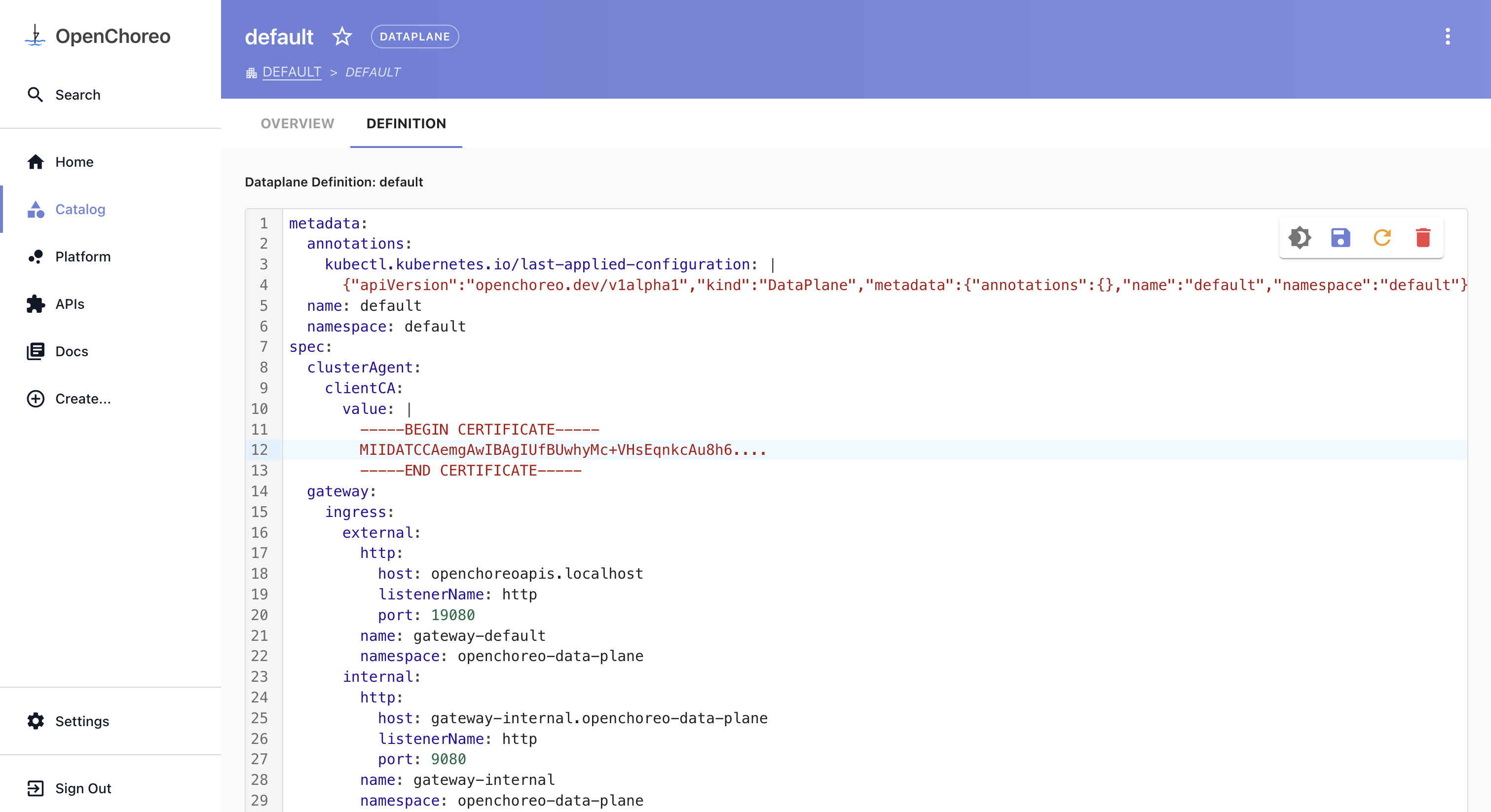
For a ClusterIP gateway, set host to the in-cluster DNS name of the gateway service: <service-name>.<namespace>.
For an internal LoadBalancer gateway, the host depends on your DNS setup. Your cloud provider will assign a private hostname or IP to the load balancer (for example, an internal ELB DNS name on AWS). You can use that hostname directly, or create a DNS record in your private hosted zone pointing to it. If you use external-dns, it can manage these records automatically when configured with the appropriate annotation filters for internal services.
Environment Gateway
OpenChoreo supports environment-level gateways for advanced use cases where a dedicated gateway is required for a specific environment — such as a production environment that demands traffic isolation, independent scaling, or separate TLS termination.
DataPlane Level Gateway          Environment Level Gateway
───────────────────────          ─────────────────────────
  ├── development traffic                  └── production traffic
  └── staging traffic
This allows you to start with the cost-efficient default topology and progressively introduce dedicated gateways for environments that require stricter isolation or higher availability guarantees.
Configuring an Environment Gateway
Step 1: Create the Gateway
Create a new Gateway resource in the openchoreo-data-plane namespace:
apiVersion: gateway.networking.k8s.io/v1
kind: Gateway
metadata:
  name: gateway-production
  namespace: openchoreo-data-plane
  labels:
    app.kubernetes.io/component: gateway
    app.kubernetes.io/part-of: openchoreo
spec:
  gatewayClassName: kgateway
  listeners:
  - name: http
    port: 19081
    protocol: HTTP
    allowedRoutes:
      namespaces:
        from: All
If you are running k3d locally, add a port mapping to the load balancer node before creating the gateway:
k3d node edit k3d-openchoreo-serverlb --port-add 19081:19081/tcp
Step 2: Register on the Environment
Patch the target Environment CR to override the gateway for that environment:
kubectl patch environment production -n default --type merge -p '{
  "spec": {
    "gateway": {
      "ingress": {
        "external": {
          "name": "gateway-production",
          "namespace": "openchoreo-data-plane",
          "http": {
            "host": "openchoreoapis.localhost",
            "listenerName": "http",
            "port": 19081
          }
        }
      }
    }
  }
}'
Alternatively, you can update this configuration from the Backstage portal. Navigate to Catalog > Environment, select the relevant Environment, go to the Definition tab, and update the YAML definition.
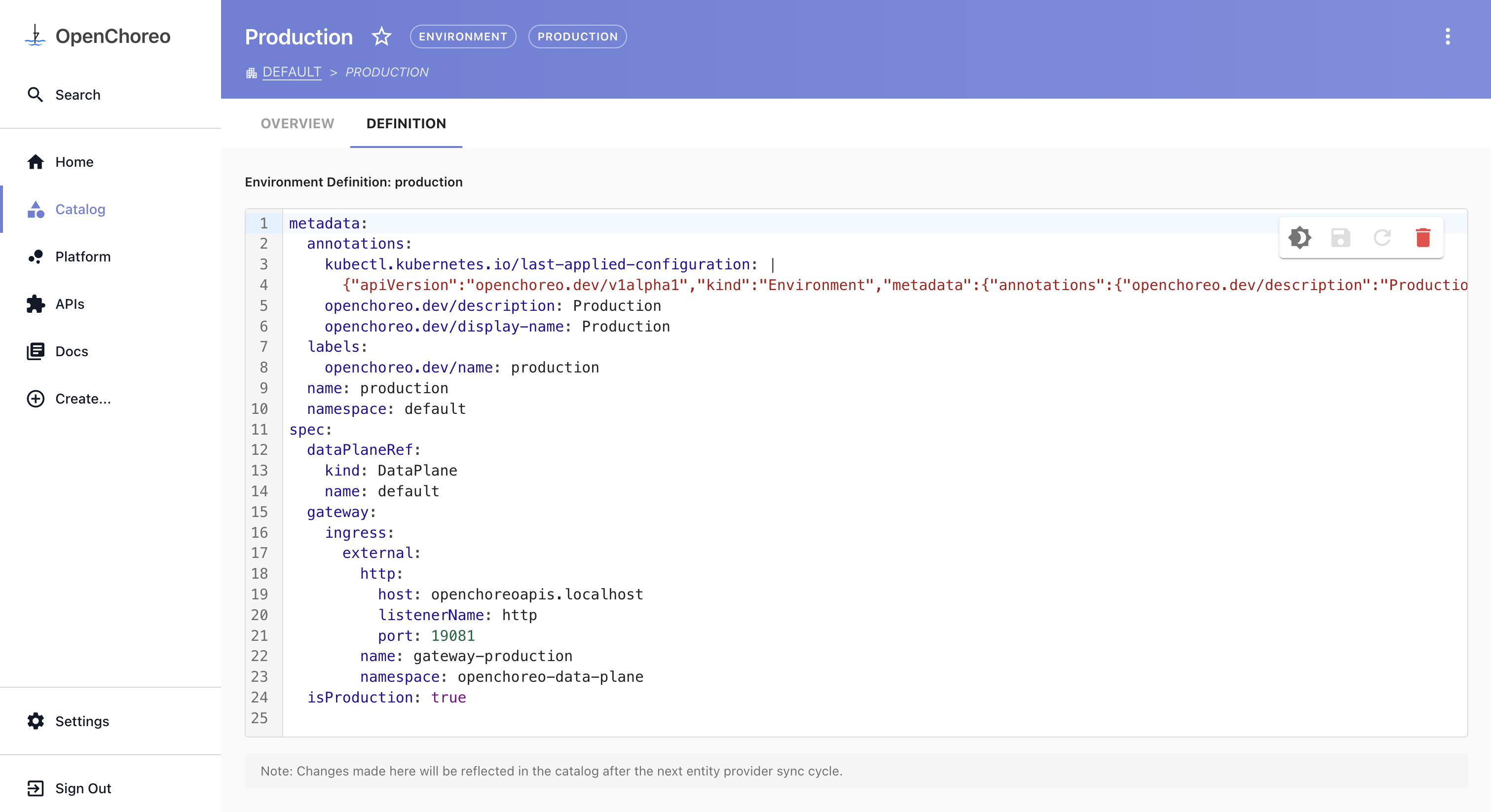
OpenChoreo will then route all APIs and routes belonging to that environment through the dedicated gateway instead of the shared Dataplane level gateway.