Creating Developer Abstractions for Kubernetes with OpenChoreo

This blog post introduces OpenChoreo’s approach to creating declarative, strongly typed, developer-friendly abstractions for Kubernetes using CEL-based ComponentTypes and Traits, with first-class Environments and release concepts that enable declarative multi-environment, multi-cluster deployments.
Motivation – Why Do You Need Abstractions with Kubernetes?
All modern software is built on many layers of abstraction, and in most cases we’re blissfully unaware of just how deep they go. When you build a simple REST API application, the framework (and the programming language) lets you think in terms of routes, handlers, and responses—not raw socket buffers, TCP handshakes, or parsing packets of data.
You describe what you want, and the abstractions take care of how it happens.
Kubernetes works the same way: it provides an higher-level API that lets you describe the desired state of your infrastructure and applications, and it takes care of the underlying mechanics to match that desired state.
While Kubernetes is a massive leap over managing raw infrastructure, it is still fundamentally a platform for building platforms, not a developer interface. Its many concepts are powerful for cluster administrators and platform engineers that work directly with it, but are overwhelming for application developers.
The developer intent (“deploy my app with port 8080”) usually gets buried under mechanics (“which of the ten different YAMLs should I write?”) resulting in what we call cognitive overload.
Why Abstractions Fail (Sometimes)
Many developer platforms attempt to solve this problem by hiding Kubernetes configuration behind layers of “magic”. This often results in leaky abstractions, where teams are forced to break out of the platform the moment they need something slightly outside the happy path. On the other end of the spectrum, thin abstractions over Kubernetes still expose too much of its surface area, yielding little-to-no cognitive relief for development teams.
With OpenChoreo, we take a different approach.
OpenChoreo enables platform teams to build declarative, strongly-typed, developer-friendly abstractions that only augment Kubernetes rather than obscure it. Developers work with clear, intent-based interfaces, while platform teams retain full visibility and authority over the underlying Kubernetes resources/configurations that result from those abstractions.
Let’s Start With an Example
Take a run-of-the-mill REST API server as an example. If you were to deploy this application on Kubernetes, you would need to compose several different resources. And while this list is by no means exhaustive, it might include the following:
- A Deployment to run your container
- A Service to expose the ports of the container to the cluster network
- An HTTPRoute (or Ingress) to expose L7 traffic to the outside world
- One or more ConfigMaps and Secrets to provide environment variables or configuration files
- Optional resources such as:
- a PersistentVolumeClaim for attaching storage (from a StorageClass in the cluster)
- a HorizontalPodAutoscaler (HPA) for scaling up
- a PodDisruptionBudget for improving resiliency during node failures or maintenance

Let’s now look at how we can build a simple developer-facing abstraction using the building blocks OpenChoreo gives us, from a platform engineer’s point of view.
-
A ComponentType is, simply put, a template that defines which Kubernetes resources are emitted when an instance of it (a Component) is created. ComponentTypes let platform engineers expose a typed set of configurable parameters to developers, surfacing only the fields they need while abstracting away the underlying Kubernetes specifics.
-
A Workload defines the runtime details: image, environment variables and (config) files and endpoints. It provides an opinionated, developer-friendly input model that ComponentTypes can reference within their templates. If the Component defines an “application”, think of the Workload as “things in the application that change with each commit” – in fact, developers can commit the Workflow to their application’s source repository so it’s always bound to a specific revision of the source code.
-
Traits represent cross-cutting capabilities that can be attached to a Component without baking them into ComponentTypes. For example, adding a persistent volume mount or an HPA to a component can be considered traits (because they can be used in many different component types).
Creating a New Component Type
To follow along, you’ll need a running OpenChoreo installation. Follow the quick start guide or any of the other installation methods in our documentation.
Every component type must have a workload type that represents its primary K8s resource (i.e. a Deployment, Statefulset, Cronjob or Job). This enables a MIME-like representation of the component type using the format {workloadType}/{componentTypeName}.
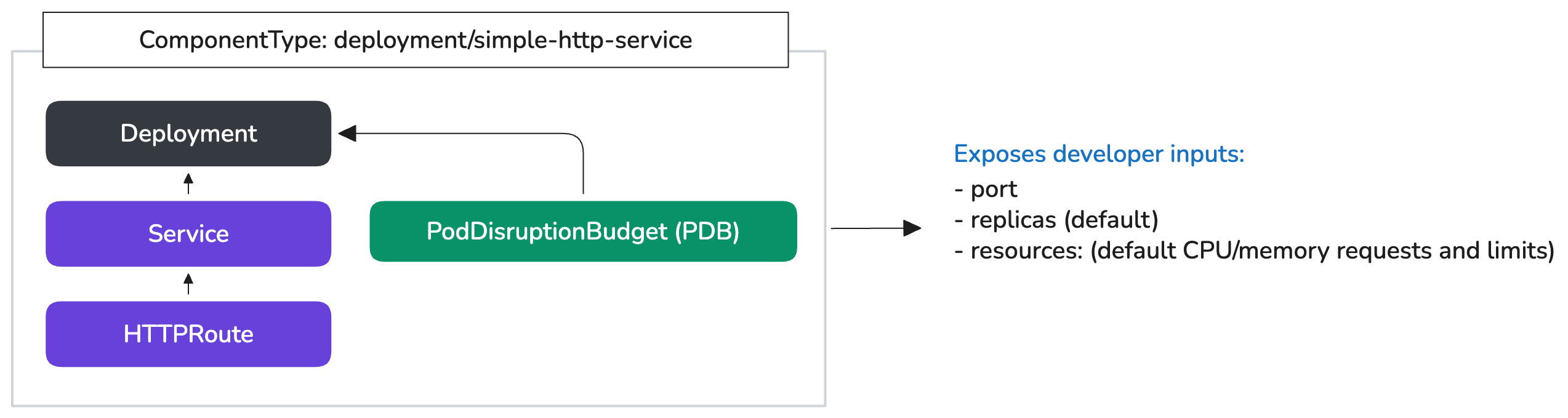
We will now create a new deployment/simple-http-service component type that will represent a K8s Deployment (which is the workloadType), Service, HTTPRoute and also a PDB (Pod Disruption Budget).
We want to expose only the port, image, default replica count and the default resource requests and limits from our developers, so those will be exposed via the resulting Component and Workload to our developers.
apiVersion: openchoreo.dev/v1alpha1
kind: ComponentType
metadata:
  name: simple-http-service
  namespace: default
spec:
  workloadType: deployment

  schema:
    types:
      Resources:
        cpu: "string | default=100m"
        memory: "string | default=256Mi"

    parameters:
      replicas: "integer | default=1"
      port: "integer | default=80"

    envOverrides:
      resources:
        requests: Resources
        limits: Resources
      minAvailable: "integer | default=1"

  resources:
    - id: deployment
      template:
        apiVersion: apps/v1
        kind: Deployment
        metadata:
          name: ${metadata.name}
          namespace: ${metadata.namespace} # The namespace is provided by OpenChoreo based on the Project
          labels: ${metadata.labels}y
        spec:
          replicas: ${parameters.replicas}
          selector:
            matchLabels: ${metadata.podSelectors}
          template:
            metadata:
              labels: ${metadata.podSelectors}
            spec:
              containers:
                - name: main
                  image: ${workload.containers["main"].image}
                  ports:
                    - name: http
                      containerPort: ${parameters.port}
                      protocol: TCP
                  resources:
                    requests:
                      cpu: ${parameters.resources.requests.cpu}
                      memory: ${parameters.resources.requests.memory}
                    limits:
                      cpu: ${parameters.resources.limits.cpu}
                      memory: ${parameters.resources.limits.memory}

    - id: service
      template:
        apiVersion: v1
        kind: Service
        metadata:
          name: ${metadata.name}
          namespace: ${metadata.namespace}
          labels: ${metadata.labels}
        spec:
          type: ClusterIP
          selector: ${metadata.podSelectors}
          ports:
            - name: http
              port: 80
              targetPort: ${parameters.port}
              protocol: TCP

    - id: httproute
      template:
        apiVersion: gateway.networking.k8s.io/v1
        kind: HTTPRoute
        metadata:
          name: ${metadata.name}
          namespace: ${metadata.namespace}
          labels: ${metadata.labels}
        spec:
          parentRefs:
            - name: gateway-external
              namespace: openchoreo-data-plane
          hostnames:
            - ${metadata.name}-${metadata.environmentName}.${dataplane.publicVirtualHost}
          rules:
            - matches:
                - path:
                    type: PathPrefix
                    value: /${metadata.name}
                  method: GET
              filters:
                - type: URLRewrite
                  urlRewrite:
                    path:
                      type: ReplacePrefixMatch
                      replacePrefixMatch: /
              backendRefs:
                - name: ${metadata.name}
                  port: 80

    - id: pdb
      template:
        apiVersion: policy/v1
        kind: PodDisruptionBudget
        metadata:
          name: ${metadata.name}
          namespace: ${metadata.namespace}
          labels: ${metadata.labels}
        spec:
          minAvailable: ${parameters.minAvailable}
          selector:
            matchLabels: ${metadata.podSelectors}
There are certain fields here that we (as platform engineers) want to override based on the target environment that it’s deployed to (like development, staging or production), so note the envOverrides which we will get to later (OpenChoreo is environment-aware).
The above ComponentType (deployment/simple-http-service) can now be used by developers to create actual instances using a Component + Workload.
apiVersion: openchoreo.dev/v1alpha1
kind: Component
metadata:
  name: foo-api
  namespace: default
spec:
  owner:
    projectName: default
  autoDeploy: true
  componentType: deployment/simple-http-service # Specifying the component type

  parameters: # These are the inputs exposed from the component type
    replicas: 2
    port: 9090
    resources:
      requests:
        cpu: "200m"
        memory: "512Mi"
      limits:
        cpu: "1000m"
        memory: "1Gi"
apiVersion: openchoreo.dev/v1alpha1
kind: Workload # This would generally be colocated with the source code
metadata:
  name: foo-api-workload
  namespace: default
spec:
  owner:
    projectName: default
    componentName: foo-api

  containers:
    main:
      image: "ghcr.io/openchoreo/samples/reading-list-server:latest"
Creating Traits
Next, we want to model a volume mount (via a PVC referencing a StorageClass available in the cluster) and a HPA as Traits so they can be used by other component types as well.
Note: The Pod Disruption Budget (PDBs) could also be modelled as a Trait, but we’ve decided to incorporate it into the Component Type to avoid exposing those details to our developers–but this is a subjective design choice; you can decide otherwise.
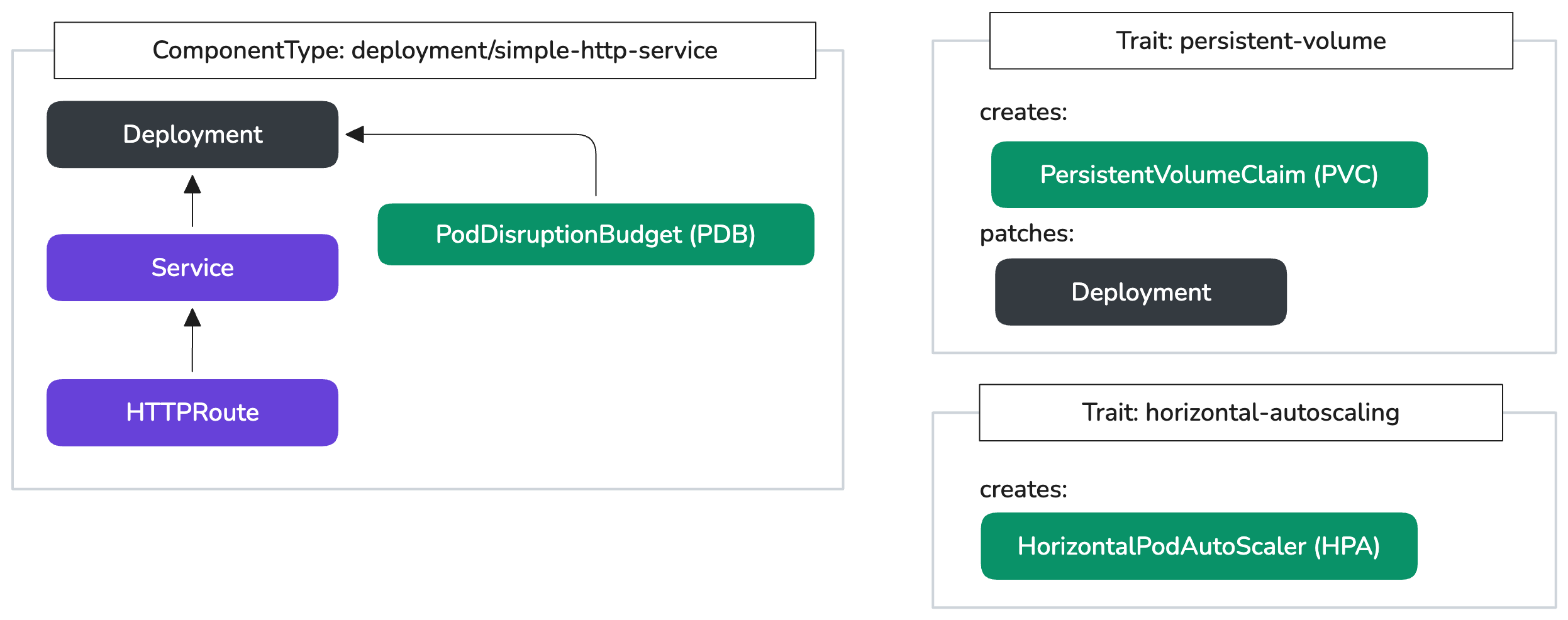
Similar to ComponentTypes, Traits can also expose a typed set of inputs for the developers, so they can compose them into their applications as needed.
apiVersion: openchoreo.dev/v1alpha1
kind: Trait
metadata:
  name: persistent-volume
  namespace: default
spec:
  schema:
    parameters:
      volumeName: "string | default=true"
      mountPath: "string | default='/var/data'"
      containerName: "string | default=main"

    envOverrides:
      size: "string | default=1Gi"
      storageClass: "string | default=local-path"

  creates:
    - template:
        apiVersion: v1
        kind: PersistentVolumeClaim
        metadata:
          name: ${metadata.name}-${trait.instanceName}
          namespace: ${metadata.namespace}
        spec:
          accessModes:
            - ReadWriteOnce
          storageClassName: ${parameters.storageClass}
          resources:
            requests:
              storage: ${parameters.size}

  patches:
    - target:
        group: apps
        version: v1
        kind: Deployment
      operations:
        - op: add
          path: /spec/template/spec/containers/[?(@.name=='${parameters.containerName}')]/volumeMounts/-
          value:
            name: ${parameters.volumeName}
            mountPath: ${parameters.mountPath}
        - op: add
          path: /spec/template/spec/volumes/-
          value:
            name: ${parameters.volumeName}
            persistentVolumeClaim:
              claimName: ${metadata.name}-${trait.instanceName}
apiVersion: openchoreo.dev/v1alpha1
kind: Trait
metadata:
  name: horizontal-autoscaling
  namespace: default
spec:
  schema:
    parameters:
      minReplicas: "integer | default=2"
      maxReplicas: "integer | default=5"
      targetCpuUtilization: "integer | default=70"

  creates:
    - template:
        apiVersion: autoscaling/v2
        kind: HorizontalPodAutoscaler
        metadata:
          name: ${metadata.name}-${trait.instanceName}
          namespace: ${metadata.namespace}
        spec:
          scaleTargetRef:
            apiVersion: apps/v1
            kind: Deployment
            name: ${metadata.name}
          minReplicas: ${parameters.minReplicas}
          maxReplicas: ${parameters.maxReplicas}
          metrics:
            - type: Resource
              resource:
                name: cpu
                target:
                  type: Utilization
                  averageUtilization: ${parameters.targetCpuUtilization}
And with that, our developers can now use these Traits in their Components.
apiVersion: openchoreo.dev/v1alpha1
kind: Component
metadata:
  name: foo-api
  namespace: default
spec:
  owner:
    projectName: default
  autoDeploy: true
  componentType: deployment/simple-http-service

  parameters:
    replicas: 2
    port: 9090
    resources:
      requests:
        cpu: "200m"
        memory: "512Mi"
      limits:
        cpu: "1000m"
        memory: "1Gi"
  traits:
    - name: persistent-volume
      instanceName: data-storage
      parameters:
        volumeName: data
        mountPath: /app/data

    - name: horizontal-autoscaling
      instanceName: hpa
      parameters:
        minReplicas: 2
        maxReplicas: 10
        targetCpuUtilization: 65
Environments
OpenChoreo provides a first-class representation for Environments. An Environment represents a runtime context (e.g., dev, test, staging, production) where workloads are deployed and executed.
OpenChoreo enables a 'build once and promote’ delivery model, where you can promote a workload from one environment to the next while changing environment-specific parameters (synonymous to “storing configuration in the environment” in the 12-factor app methodology).
You’ll remember that we exposed certain fields in the ComponentType and in Traits as ‘envOverrides’. This is where OpenChoreo’s ReleaseBinding comes into play.
-
A ComponentRelease is an immutable snapshot of a component at a specific point in time. When you create a release, OpenChoreo takes the Component, its Workload configuration, the selected ComponentType, and any attached Traits, and inlines all of them into a single CR. Think of this as a lock file (like your package-lock.json or go.mod file).
-
A ReleaseBinding represents an environment-specific deployment of a Component. It binds a specific ComponentRelease to an environment and allows platform engineers to override component parameters, trait configurations, and workload settings for specific environments like development, staging, or production.

If we were to deploy this to the default development environment (which is already installed with the OpenChoreo Data Plane: run kubectl get environments to explore), we, as platform engineers, can override those environment-specific fields in the ReleaseBinding like so:
apiVersion: openchoreo.dev/v1alpha1
kind: ReleaseBinding
metadata:
  name: foo-api-development
  namespace: default
spec:
  owner:
    projectName: default
    componentName: foo-api

  environment: development # Bind to the target environment

  componentTypeEnvOverrides: # Override the env-specific fields exposed in the component type
    resources:
      requests:
        cpu: "50m"
        memory: "128Mi"
      limits:
        cpu: "200m"
        memory: "256Mi"

  traitOverrides: # Override the env-specific fields exposed in the traits
    data-storage: # Instance name of the "persistent-volume" trait
      size: 10Gi
      storageClass: local-path
Putting It All Together
- Apply all of the above resources in your OpenChoreo control plane cluster:
kubectl apply --server-side -f https://gist.githubusercontent.com/binura-g/1ce4d2bfd2ecf903f5755f6900084e31/raw/ce945e4da0045e2adc377c5afad5ce007a88f2c5/openchoreo-ct-blog-v0.7.yaml
- Check the status of the releasebinding which creates the actual K8s resources in the target environment in the data plane cluster:
kubectl get releasebinding foo-api-development -o yaml | grep -iA 50 "status:"
- Find the namespace created for the target environment in the data plane cluster:
NS=$(kubectl get ns -l openchoreo.dev/environment=development -o jsonpath='{.items[0].metadata.name}')
- Observe that all the resources have been created successfully in the target environment:
kubectl --namespace $NS get all,httproute,pvc
Sample output:
NAME                                                       READY   STATUS    RESTARTS   AGE
pod/foo-api-development-ed312ff3-669778f595-8ktcc          1/1     Running   0          3h37m
pod/foo-api-development-ed312ff3-669778f595-x62rp          1/1     Running   0          3h38m

NAME                                   TYPE        CLUSTER-IP     EXTERNAL-IP   PORT(S)   AGE
service/foo-api-development-ed312ff3   ClusterIP   10.43.97.66    <none>        80/TCP    3h38m

NAME                                                   READY   UP-TO-DATE   AVAILABLE   AGE
deployment.apps/foo-api-development-ed312ff3           2/2     2            2           3h38m

NAME                                                             DESIRED   CURRENT   READY   AGE
replicaset.apps/foo-api-development-ed312ff3-669778f595          2         2         2       3h38m

NAME                                                                   REFERENCE                                 TARGETS       MINPODS   MAXPODS   REPLICAS   AGE
horizontalpodautoscaler.autoscaling/foo-api-development-ed312ff3-hpa   Deployment/foo-api-development-ed312ff3   cpu: 2%/65%   2         10        2          3h38m

NAME                                                                       HOSTNAMES                                                               AGE
httproute.gateway.networking.k8s.io/foo-api-development-ed312ff3           ["foo-api-development-ed312ff3-development.openchoreoapis.localhost"]   3h38m

NAME                                                              STATUS   VOLUME                                     CAPACITY   ACCESS MODES   STORAGECLASS   VOLUMEATTRIBUTESCLASS   AGE
persistentvolumeclaim/foo-api-development-ed312ff3-data-storage   Bound    pvc-1b4dbf63-25a2-4212-850d-85db573f3f35   10Gi       RWO            local-path     <unset>                 3h38m
Next steps: Adding Config and Secret Support
For brevity, we will omit this part in this article but you can find a reference implementation here that incorporates environment-specific configmaps and secrets from an external secret store: https://github.com/openchoreo/openchoreo/tree/release-v0.7/samples/component-types/component-with-configs
Explore Built-in ComponentTypes
OpenChoreo ships with a set of default ComponentTypes that will cover a majority of common use cases. But these are also fully extensible, so you can customize them or create your own from scratch as we did above.
$ kubectl get ct # or kubectl get componenttypes
NAME              WORKLOADTYPE   AGE
scheduled-task    cronjob        86m
service           deployment     86m
web-application   deployment     86m

$ kubectl get ct service -o yaml
OpenChoreo is still under heavy development and we're shaping it with real-world feedback. If you have any questions, suggestions, or want to contribute, please join us on GitHub Discussions or Discord.
Happy building!